Browse categories
Explore
Fiverr Pro
English
$
USD



Are repetitive Windows tasks taking up your time?
I create practical Python or PowerShell scripts for small, clearly defined workflows.
Examples:
- Rename, move, sort, or organize files
- Process CSV or text files
- Generate simple reports
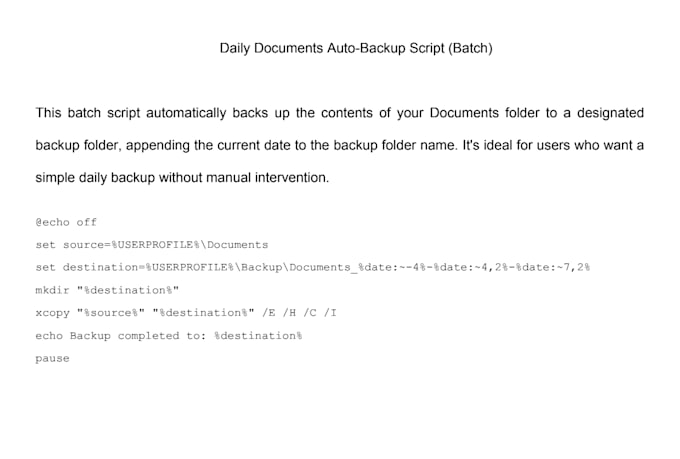
- Copy or archive files on a schedule
- Run repeatable system or office tasks
- Add simple validation, logs, or error messages
I will review your goal, confirm the inputs and expected output, then build and test the script against sample data you provide. You receive the script, setup instructions, and notes explaining how to run it.
This Gig is for task automation, not full applications, credential bypass, cybersecurity tools, or scraping that violates a website's terms. Please contact me before ordering if the workflow connects to third-party services, needs API access, or handles sensitive data.
AI Content, Automation and IT Support
Languages
Q: What do you need from me to get started?
A: A clear description of the task you want to automate, any sample files if applicable, and your system environment (Windows/Linux/macOS)
What if I’m not sure how to explain the task?
No worries! Just tell me what result you want and I’ll ask the right questions to figure out the best way to automate it.
Can you create scripts that run on a schedule (like daily or weekly)?
Absolutely! I can write scripts for scheduled execution using cron (Linux/macOS) or Task Scheduler (Windows).
Will you help me run the script on my machine?
Yes! If you choose the Standard or Premium package, I’ll guide you through running it or provide setup instructions.
What kind of tasks can you automate?
I can automate tasks like opening programs, copying/moving files, renaming folders, cleaning up your desktop, generating basic reports, and more – using Python, Batch, or PowerShell.
I'm not technical – will I know how to use the script?
Absolutely. I always provide clear instructions, and if needed, a simple interface or one-click solution so it's easy for anyone to use.