Browse categories
Explore
Fiverr Pro
English
$
USD
Public contract and grant research, Excel automation, data cleaning
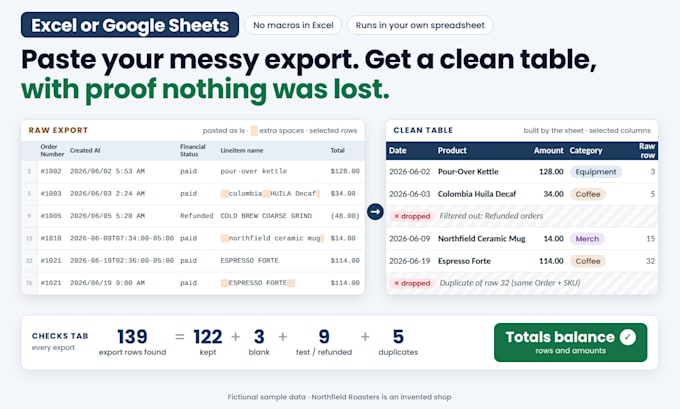
Every week you download the same export (orders, transactions, inventory, leads) and spend an hour fixing it. I'll build a spreadsheet that does it for you: paste the new export into the Raw tab and get a clean table.
What it fixes:
- Dates and amounts stored as text ("$1,234.50", "(12.00)", "2026/06/02 5:53 AM") become real dates and numbers
- Extra spaces, odd capitals, split or combined fields
- Categories from keywords you can edit yourself ("kettle" = Equipment)
- Test, refunded or blank rows filtered out, duplicates removed
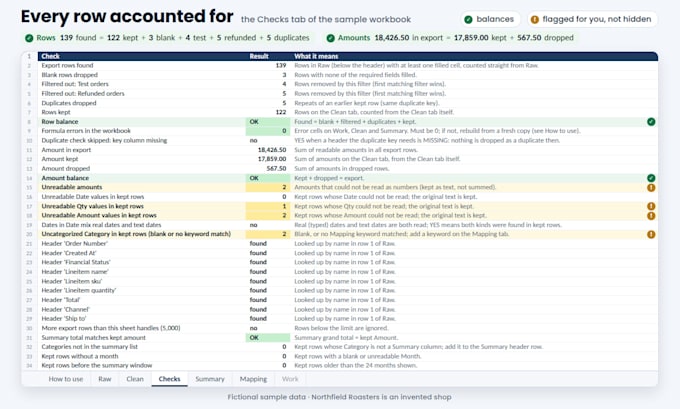
Every sheet has a Checks tab: rows in, rows dropped and why, rows kept, and totals that must balance. If something doesn't add up, it tells you instead of hiding it.
Excel: formulas only, no macros (Excel 2019 or Microsoft 365). Google Sheets: a small script that only touches that one spreadsheet, run from a menu.
You don't need to send real data. A sample with made-up values in the same layout is enough, because the automation runs in your own spreadsheet.
AI-assisted build, tested on your sample before delivery. I don't log into your accounts or connect other systems.



What do I need to send?
A sample of the export exactly as your system downloads it (CSV or Excel), plus the columns you want and any rules. Made-up values in the same layout are fine. Please remove personal details.
Which versions of Excel or Google Sheets work?
Excel 2019 or later, or Microsoft 365, with no add-ins or macros. Google Sheets works with a personal or work Google account that allows Apps Script: you paste in a small script once (about 3 minutes, instructions included).
What if my export changes?
Columns are found by their header name, so reordered columns still work. If a column is renamed or missing, the Checks tab shows it as MISSING. Small fixes within your original scope are covered by your revisions.
How many rows can it handle?
Up to 5,000 rows per export in Excel or Google Sheets. The Checks tab warns you if an export is bigger. Ask before ordering if you need more.
Is my data safe?
The automation runs inside your own spreadsheet. The Excel version is plain formulas. The Google Sheets script can only read and write the spreadsheet it is installed in and sends nothing anywhere.
Is this AI-generated?
AI-assisted. The formulas and script come from a tested template, then run on your sample and are checked before delivery: the Excel formulas and the script must give the same result.
What don't you do?
No VBA macros, Power Query, dashboards, account logins, connections to other apps, or manual data entry.