Browse categories
English
$
USD
Connect to your AI


Tired of updating your reports manually every single week?
You're in the right place.
I build professional Looker Studio and Google Data Studio
dashboards, SaaS reports & dashboard automation designed
to refresh themselves, answer real business questions and
give your team or clients data they can actually act on.
WHAT YOU GET:
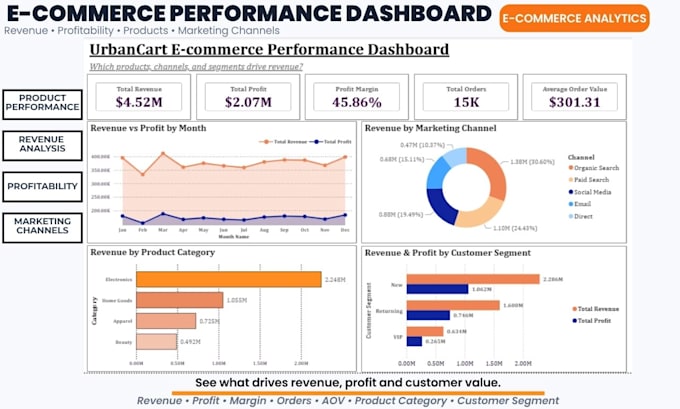
Looker Studio & Google Data Studio dashboard design
Dashboard automation with scheduled live data refresh
SaaS reports built for client-facing products
Data source connectivity Sheets, SQL & APIs
Interactive & animated visuals with filters
Web embedding for external sharing & portals
PERFECT FOR:
SaaS founders needing automated product reports
Teams replacing manual weekly reporting
Agencies building client-facing dashboards
Businesses connecting live data to clean visuals
WHY CHOOSE ME:
Every chart earns its place no filler visuals
Built for the decisions your report must support
Fast delivery with full walkthrough on handoff
All packages include data connectivity & revisions.
Not sure what's possible with your data? Just message me
I'm happy to figure it out with you before you order.
Data Analyst, Power Bi, Google Data Studio Dashboard Design, Python, Scraping
Languages
What is the difference between Looker Studio and Google Data Studio?
They are the same tool — Google rebranded Data Studio as Looker Studio in 2022. Whether you call it one or the other, I work with both and you will get the same quality of output either way.
Can you connect my dashboard to a live data source?
Yes. I connect reports to live and scheduled data sources including Google Sheets, SQL databases, REST APIs, BigQuery and most common connectors so your dashboard stays current without manual input.
What does dashboard automation actually mean for me?
It means once your dashboard is built, it updates on its own. No more exporting CSVs, copying data or refreshing anything manually — your report just reflects your latest data every time someone opens it.
Can this dashboard be embedded on my website or client portal?
Yes. Web embedding is included in the Premium package and available as an add-on for Basic and Standard. I provide the embed code so your report lives directly on your site, portal or product.
I am building a SaaS product — can you design reports for my end users?
Yes. SaaS reports are designed with end-user experience in mind — clean layouts, intuitive filters and branded visuals that feel like a native part of your product rather than a third-party tool.
My data is messy and inconsistent — can you still build the dashboard?
Yes. I can help structure and prepare your data before building the report. If the cleaning work is significant I will flag it upfront so we can agree on scope before starting.
Can you add interactive filters and animated visuals?
Yes. Interactive elements including date range controls, dropdown filters, cross-filtering and animated visuals are included in Standard and Premium packages and available as an add-on for Basic.
What if I need more than three dashboards or report pages?
Use the additional dashboard add-on to scale up your order. Alternatively message me before ordering with your full requirements and I will put together a custom quote for the right scope.
Will I be able to manage and edit the dashboard myself after delivery?
Yes. Looker Studio is a no-code tool and I design reports to be intuitive enough for non-technical users to navigate and update. I also include a walkthrough on delivery so you feel confident using it.
Can you redesign or improve a Looker Studio report I already have?
Yes. Share your existing report link when placing your order and describe what is not working or what you want improved. Redesign work follows the same delivery timeline as a new build.