Browse categories
Explore
Fiverr Pro
English
$
USD





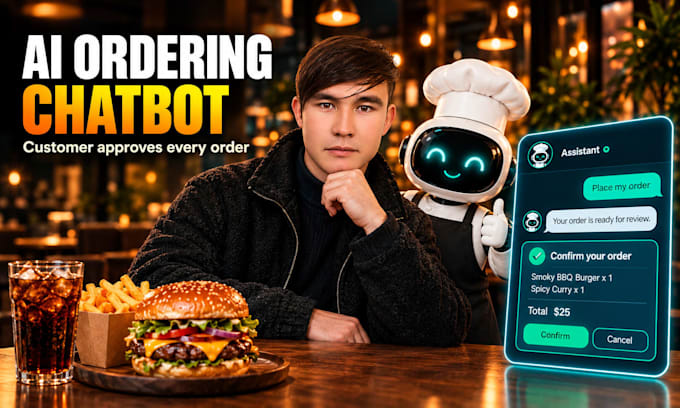
Turn your restaurant website into an AI ordering assistant that adds dishes to the cart, answers menu questions and never places an order without the customer's approval.
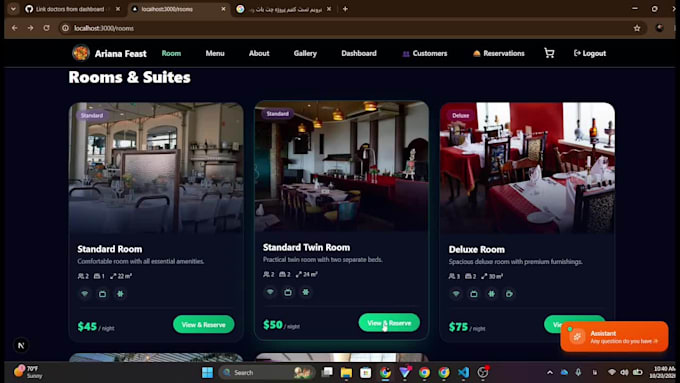
I build AI agents with LangGraph, FastAPI, Next.js and Supabase. The system in my demo video shows what you can get.
WHAT THE PREMIUM PACKAGE INCLUDES
- Chat widget on every page of your site
- Tool-calling agent: menu search, cart, checkout, order status, cancellation
- Confirmation card (human-in-the-loop) before any order is final
- Cart stored in your database, so website and chatbot stay in sync
- Photo and price cards inside the chat
- Business rules enforced in code, e.g. cancel only while the order is pending
- Per-conversation message limits
- Full source code and setup guide
OTHER PACKAGES
Basic: chat widget that answers from your menu or FAQ.
Standard: adds live database tools and product cards.
Works for restaurants, cafes and online food or retail stores. Online payment is not included by default (available as an extra).
Questions? Message me your use case before ordering.
AI Engineer LangGraph Agents RAG
Languages
Q1: What exactly will I receive?
A: A working AI chat widget (Next.js) plus a FastAPI backend, with full source code and a setup guide. Basic answers from your data, Standard adds database tools, Premium adds cart, approval card and order handling.
Q2: Can the AI place an order or charge a customer without approval?
A: No. In Premium, every order goes through a confirmation card showing items and total. The order is created only after the customer clicks Confirm. Online payment is not included by default (available as an extra).
Q3: Which package should I choose?
A: Basic: answers questions from your menu or FAQ. Standard: also reads live data from your database. Premium: full ordering flow with cart, approval, status and cancel. Not sure? Message me your use case before ordering.
Q4: What do you need from me to start?
A: Your menu or catalog data, a Supabase or Postgres database (I can guide the setup), an LLM API key (OpenRouter or OpenAI) and your website framework. I will ask for the details in the order requirements.
Q5: Who pays for the AI model usage?
A: You do. The agent runs on your own API key, so usage costs go to your provider account. Cost per conversation depends on the model, and I can help you pick a cost-effective one.
Q6: Will it work with my existing website?
A: Yes for Next.js or React sites. For other platforms, the backend exposes a standard REST endpoint, but the widget may need adaptation. Please message me first so I can confirm before you order.
Q7: Is this only for restaurants?
A: No. The same architecture fits hotels, online stores, clinics and any booking or ordering flow. Tools and business rules are adapted to your domain. One business domain per order.
Q8: Which languages are supported?
A: One language is included per order (English by default). Additional languages, including right-to-left ones such as Persian or Arabic, are available as a Gig Extra.
Q9: How many revisions are included, and what counts as one?
A: Basic 1, Standard 2, Premium 3. A revision is a change within the agreed scope (wording, behavior, UI tweaks). New features or tools are not revisions; I offer them as extras or a custom offer.
Q10: How do you protect the system from misuse?
A: Messages per conversation are capped, business rules (for example cancel only while pending) are enforced in code, and sensitive actions need customer confirmation. No system is risk-free, so I also recommend rate limiting before launch.