Browse categories
Explore
Fiverr Pro
English
$
USD
Power BI Data Analyst for Business and Financial Dashboards
I help businesses turn raw data into clear and interactive Power BI dashboards with meaningful insights.
If you have data but struggle to understand performance, trends, or KPIs, I will design a dashboard that makes your data easy to read and useful for decision making.
What I offer
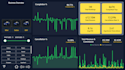
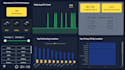
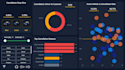
Interactive Power BI dashboards
KPI and performance tracking reports
Business, sales, and financial analysis
Clean visuals with strong data modeling
DAX measures for meaningful insights
I work with Excel, CSV, and structured datasets. My focus is on clarity, usability, and business value, not just charts.
Packages
Basic: Simple dashboard and key metrics
Standard: Deeper insights and better storytelling
Premium: Advanced dashboard with executive level summary and insights
Why choose me
Clean and professional dashboard design
Business focused analysis
Clear communication and revisions
Honest pricing with quality delivery
Please message me before ordering so we can discuss your data and choose the right package.
Lets turn your data into insights you can actually use.


What do you need from me to start the project?
I need your dataset (Excel, CSV) and a short explanation of your business goals or KPIs. If you are unsure, I will help you define them.
Do you provide the Power BI (.pbix) file?
Yes, I deliver the complete Power BI (.pbix) file so you can edit, refresh, or extend the dashboard anytime.
Can you customize the dashboard based on my business needs?
Yes, all dashboards are customized according to your data, KPIs, and use case. Designs are not reused between clients.
Do you work with large datasets?
Yes. I have experience working with datasets up to around 1 million rows in Power BI. I use clean data models and efficient DAX to ensure good performance.
What is included in revisions?
Revisions include layout changes, visuals adjustments, and KPI refinements within the agreed scope of the package.
Will you explain how to use the dashboard?
Yes, I provide a short explanation or walkthrough so you understand how to use and interpret the dashboard.
Should I message you before placing an order?
Yes, messaging first is recommended so we can confirm requirements and select the right package.
Can you connect Power BI to live data sources?
I work with refreshable data in Power BI Desktop using Excel, CSV, and exported data sources. Live service-based connections may require Power BI Service, which is not included.


