Browse categories
English
$
USD
Connect to your AI
MikroTik and ISP Network Engineer, Starlink Load Balancing
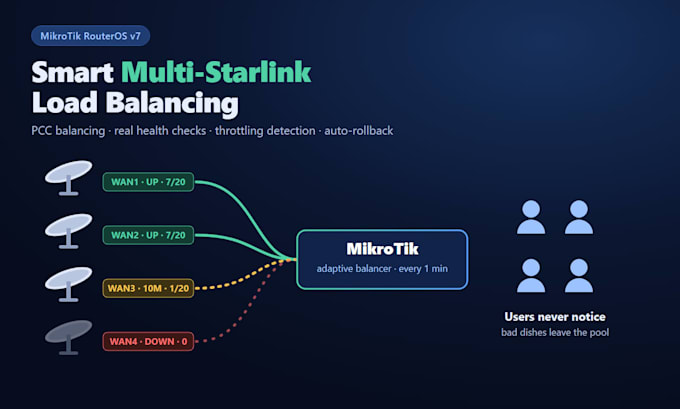
Running 2, 3 or more Starlink dishes (or ISPs) on a MikroTik and still getting slowdowns, dead links that "look up", or users complaining when one dish is throttled?
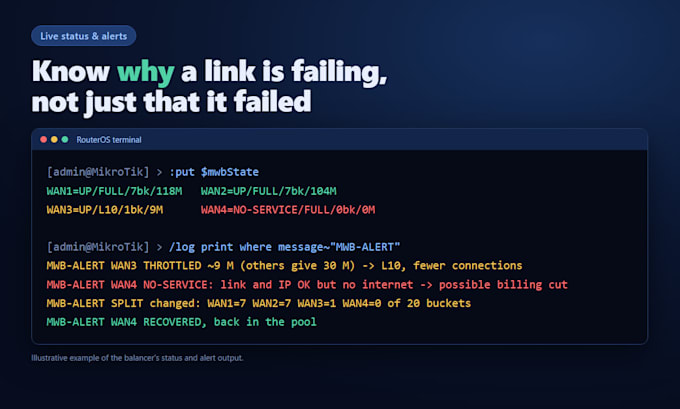
I operate rural ISP networks with 4+ Starlinks per site on MikroTik every day, and I will install the same adaptive balancer I run in production:
HOW IT WORKS
Please message me BEFORE ordering with your router model, RouterOS version and number of links.
Hablo español, también atiendo en español.



Device:
Router
Operating system:
Linux
•
Other
Do I need RouterOS v7?
Yes. If you are on v6 I can upgrade you first (included in Standard and Premium).
Will I lose internet during the install?
Only about 1-2 seconds. If anything fails, the router rolls back to your previous config by itself in 6 minutes.
Does it work with Starlink in router mode (no bypass)?
Yes, but bypass mode is recommended. It also works with fiber, cable, 4G/5G or any other ISP.
What about banking or gaming problems with multiple IPs?
Sessions stay on one link, and I can exclude specific sites or devices from balancing so they always use the same WAN.