Browse categories
English
$
USD
Connect to your AI
Remote IT support for small businesses
Email migration done properly, without the downtime.
I move mailboxes into Google Workspace or Microsoft 365 from any provider: GoDaddy, cPanel hosting, Exchange, IMAP, or another tenant. Your mail arrives with contacts and calendar intact, and mail flow is verified before I call it done.
What's included:
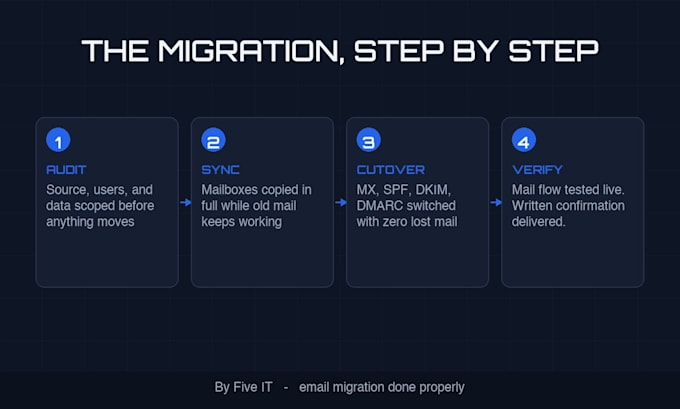
Most migration gigs stop at "mail moved." The part that actually breaks businesses is DNS. Records pointed wrong mean lost email for days, and most people find out from a client. I handle the cutover and prove mail flows before you go back to work.
I've set up and administered both platforms for small businesses. If you're not sure which platform fits you, tell me what you run today and I'll give you a straight answer, even if that answer is "stay where you are."
Have more than ten users, or a tricky source like an old Exchange server? Message me before ordering. I'd rather scope it right than promise fast.




Type of Migration:
Email Migration
•
File Storage Migration
Destination Platform Migrations:
Google Workspace
•
Microsoft 365
Will my email be down during the migration?
Done right, no. Mail syncs to the new tenant before the DNS cutover, so the switch itself is a records change. There can be a short delivery delay while records propagate, usually under an hour. You don't lose mail.
Do you handle the DNS records?
Yes. MX, SPF, DKIM, and DMARC are updated as part of every package. This is the step most migrations get wrong, and it's where lost email actually comes from.
Can you migrate from GoDaddy, cPanel, or an old Exchange server?
Yes. Any source with IMAP access or an export path works: hosted providers, cPanel mail, on-premise Exchange, or another Microsoft 365 tenant. Message me if your source is unusual and I'll confirm before you order.
Do I need to buy my Google Workspace or Microsoft 365 licenses first?
Yes, the seats need to exist before mailboxes can move. If you haven't bought yet, tell me how many users you have and I'll tell you exactly what to order so you don't overpay for licenses you don't need.
Will I lose any old email?
No. The full mailbox moves: every message, folder, contact, and calendar entry. I verify counts after the move and include a written confirmation of what was migrated and tested.
What do you need from me to get started?
Admin access to the new tenant (or a one-time authorization to set it up), plus the login details or admin contact for the current mail provider. I'll send a short checklist when the order starts.
What happens if something is wrong after the migration?
Report it within the support window and I fix it at no charge. Premium includes 7 days of post-migration support. Basic and Standard include a verification pass at delivery, and I don't close an order while mail flow is unproven.