Browse categories
Explore
Fiverr Pro
English
$
USD

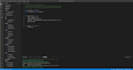


Need a private way to read PDFs and notes on your own PC, without it looking like a typical reader?
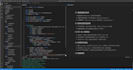
I deliver a ready-to-run Windows app that looks like Visual Studio Code. Open PDF, Markdown, and TXT in a familiar editor layout. Files stay on your machine. Nothing is uploaded.
What you get
- A Windows folder with filereader.exe. Unzip and double-click. No Python setup.
- Import by drag, paste, or File Open
- Split editor for documents, with Alt+Q cover
- Your own code files keep real names and stay edit-only, never executed
- Explorer you can hide, collapse, and close files from
How it works
1. I send a zip of the app folder
2. You unzip it and double-click filereader.exe
3. Import files and work as if you are in an IDE
This is a finished product, not a custom build from scratch. Source code is not included. Want a custom window title or project name? Choose Standard or Premium.
Windows 10 or 11 is required. If the window does not open, install the free Microsoft Edge WebView2 Runtime.
Data Mining Engineer, Machine Learning and AI Specialist
Languages
What do I need to run it?
Windows 10 or 11. Unzip the folder and double-click filereader.exe. No Python install.
Do my files leave my computer?
No. The app runs only on your PC. Documents stay in a local folder next to the app.
Do you include the source code?
No. You get the ready-to-run app. Source code is not part of any package.
Can it run my code?
No. Uploaded code can be edited and saved. It is never executed.
Which files can I open?
PDF, Markdown, and TXT open as documents. Common code files can be edited only.
What is Alt+Q?
It covers the document pane with a markdown view so the window stays looking like an editor.
The window does not open. What should I do?
Install the free Microsoft Edge WebView2 Runtime, then start filereader.exe again.


