Browse categories
English
$
USD
Connect to your AI

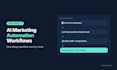
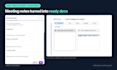


Still copying leads between apps, sending follow-ups by hand or chasing meeting notes? I'll build AI-powered automations in Zapier or Make that do the repetitive work for you.
What I can automate:
- Lead capture: form to CRM, sheet and instant email reply
- Lead qualification and routing to the right person
- Client onboarding: welcome emails, tasks and folders
- AI steps that summarise, tag or draft replies with ChatGPT
- Meeting notes turned into action items and updates
- Content workflows across Trello, Google Sheets and Slack
Why me:
I'm a growth marketer with 3+ years in B2B and D2C. In my last full-time role I built AI-assisted content workflows that saved 30+ hours a month. My gallery shows Zapier, Make and Trello automation builds.
How it works:
1. You describe the task and the apps you use
2. I map the workflow and confirm it with you
3. I build, test with real data and switch it on
4. You get a walkthrough and handover notes
Fixed scope, two revisions, updates every two days. Message me before ordering so I can check your apps and plans.
AI Native Growth Marketing
Languages
Should I use Zapier or Make?
Zapier is simpler and great for straightforward automations. Make is cheaper for complex, many-step workflows. Tell me what you want to automate and I’ll recommend the right one.
Do I need paid Zapier or Make plans?
Often yes. Multi-step workflows usually need a paid plan, and AI steps need an OpenAI account. The automations run on your accounts, so you keep full control. I’ll tell you exactly what you need before you order.
Which apps can you connect?
Most popular apps, including Google Sheets, Gmail, HubSpot, Slack, Trello, Notion, Typeform and Calendly. Message me your app list and I’ll confirm.
What if something breaks later?
I test every workflow with real data before handover. In Premium, I add error alerts so you know straight away if a step fails. I also fix any issues with my work after delivery.
Do I need to share my passwords?
No. Most of the time you invite me to your Zapier or Make account or connect the apps yourself while I guide you. I never need your passwords.


