Browse categories
English
$
USD
Connect to your AI
Azure Cloud Engineer, AI Agent and Microsoft Copilot Developer
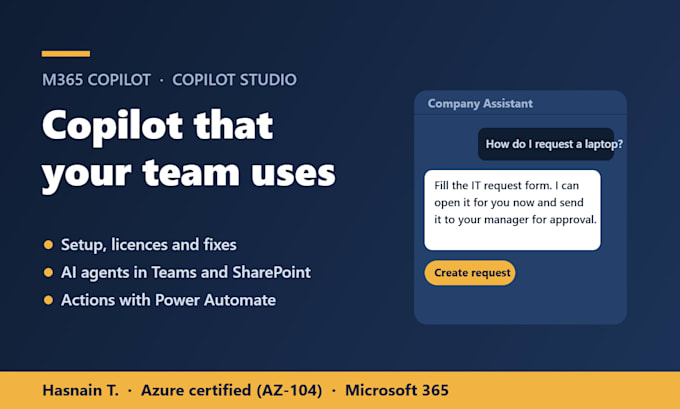
You pay for Microsoft 365 Copilot but your team barely uses it, or you want an AI agent that answers staff and customer questions from your own content. I set up Copilot properly and build Copilot Studio agents that work inside Teams, SharePoint and your website.
What I do
- Microsoft 365 Copilot setup, licence checks and fixes when Copilot is missing or not working
- Data and permission review, so Copilot only shows people what they should see
- Copilot Studio agents that answer from SharePoint, websites and files
- Agent actions with Power Automate: create tickets, send approvals, update lists
- Deployment to Microsoft Teams, your website or SharePoint
Why work with me
- Microsoft Azure certified (AZ-104) with Microsoft 365 and Entra ID experience
- I work with the access you grant and never need your password
- Every agent is tested on your real questions before handover
- Clear guide and a handover call, so your team can manage it
Not sure what you need? Message me what you want Copilot to do and I'll recommend the right package.
Device:
Desktop
•
Laptop
•
Server
•
Mobile
•
Tablet
Operating system:
Windows
•
Linux
•
IOS
•
Android
Do I need a Copilot licence?
For Microsoft 365 Copilot, yes. Copilot Studio agents need a Copilot Studio licence or pay-as-you-go messages. I check what you have before we start.
Copilot is not showing up for my users. Can you fix it?
Yes. That is usually licence assignment, update channel or app settings. The Basic package covers finding and fixing it.
Will Copilot show people files they should not see?
Copilot follows your existing permissions, so overshared files are a real risk. I review sharing on key sites and fix the biggest gaps before rollout.
What can a Copilot Studio agent do?
Answer HR, IT or customer questions from your documents, guide people through a process, and with Power Automate take actions like creating tickets or requests.
What access do you need?
A temporary admin or maker account you create for me, or a screen-share session. I never need your personal password, and you remove access at handover.
Can the agent work in Microsoft Teams?
Yes. Standard and Premium agents are published to Teams, and can also go on your website or SharePoint.
Can you train my team to use Copilot?
Yes. Every package includes a walkthrough, and I can run a recorded team session with prompts for Outlook, Teams, Word and Excel as an add-on.
