Browse categories
English
$
USD
Connect to your AI
Linux server setup, nginx, SSL and emergency fixes
You need a VPN that actually works, on your own server, with a panel you can manage yourself.
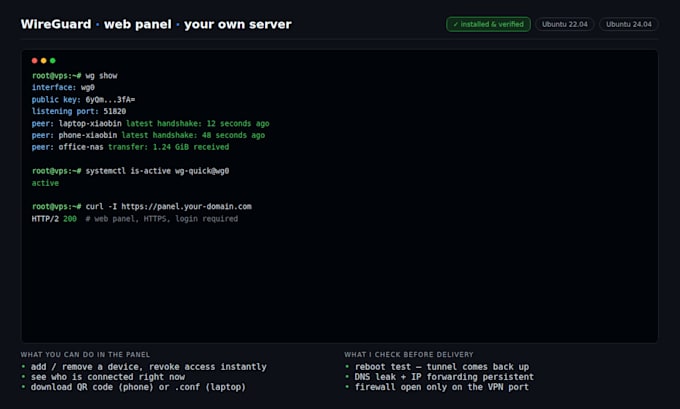
I install WireGuard (recommended) or OpenVPN on your Linux VPS and put a web admin panel in front of it, so adding or removing a user is a click instead of editing config files.
What you get:
- WireGuard or OpenVPN installed and hardened on Ubuntu/Debian
- Web admin panel: add or remove peers, disable a device, see who is connected
- Per-device configs: QR code for phones, .conf file for laptops
- Firewall and NAT set up correctly, IP forwarding persistent after reboot
- Split tunnel option, so only chosen traffic goes through the tunnel
- DNS leak prevention
- Connection tested from a real client before delivery, with the output shown to you
What I do not do:
- No reseller or multi-tier "sell access" panels. This is remote access for your own team.
- No shared accounts. Every key belongs to you.
Ten minutes of questions before I start saves you a rebuild later.



Server:
Virtual private server
•
DNS
•
Web server
Operating system:
Linux
•
Unix
WireGuard or OpenVPN, which should I pick?
WireGuard for speed and battery life on phones. OpenVPN when you need to work over TCP 443 or support older clients. Tell me your use case and I will recommend one before you order.
Do you need my server password?
Yes, temporary root or sudo SSH access. Change it right after delivery; the report shows exactly what I changed.
Which panel do you install?
Wg-Easy or wg-ui for WireGuard, an OpenVPN admin panel for OpenVPN. A plain web UI: add and remove peers, disable a device, see who is connected. No reseller or multi-tier features.
Can I add users myself later?
Yes. The panel is yours and I include a short written guide: add a peer, download the QR code or config file, revoke access.
Will it still work after a reboot?
Yes. The service is enabled in systemd, IP forwarding is persistent, and I reboot-test before delivery.
Do you keep my credentials?
No. Access is deleted after delivery. The report contains commands and screenshots, never your password.