Browse categories
Explore
Fiverr Pro
English
$
USD



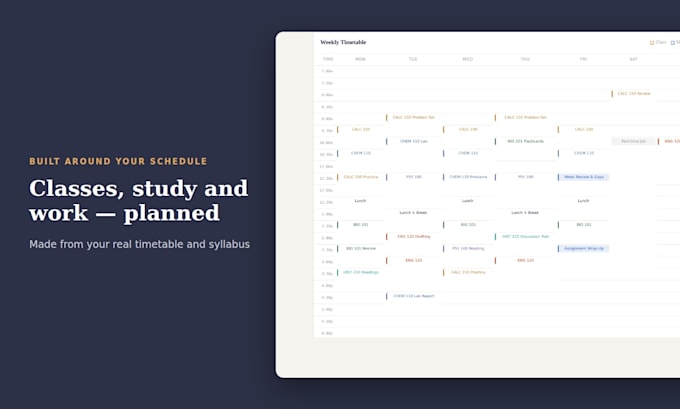
Juggling classes, deadlines, exams and a part-time job? I'll build you a personal study dashboard that tells you exactly what to work on each day.
WHAT YOU GET
TWO WAYS TO ADD YOUR INFO
PREMIUM: AI TUTOR
Upload your lecture notes and the tutor explains concepts from YOUR material, with math formatting and graphs. It guides you with hints instead of doing your assignments.
WHO IT'S FOR
Students, parents tracking homework, tutors managing several students, and professionals balancing work with courses.
HOW IT WORKS
Not sure which package fits? Message me first.
AI automation
Languages
Do I need to install anything?
No. Basic and Standard are one file you open in Chrome, Safari or Edge. Premium is a private web link.
Where is my data saved?
In Basic and Standard, your data stays in the browser on your device. Clearing your browser data erases it. In Premium, it's saved online, so it syncs between your laptop and phone.
Will the AI tutor do my homework?
No. It explains concepts from your own course files and guides you with hints and practice questions.
I'm a tutor or teacher. Does this work for me?
Yes. Courses become students or classes, and assignments become lessons or homework you're tracking.
Can you update it next semester?
Yes. Order the Next semester update extra and send your new timetable.
Do I have to type in all my course info?
No. You can add syllabi, notes and your schedule by hand, or use the Premium browser extension. It picks up new deadlines and changes from your school portal while you're logged in and sends them to your dashboard. You never share your password.