Browse categories
English
$
USD
Connect to your AI

Level 2

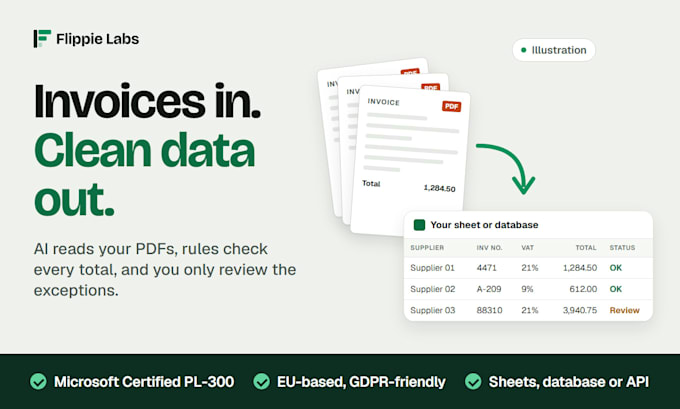
If someone on your team opens every invoice PDF and types it in by hand, I can take that job off their desk.
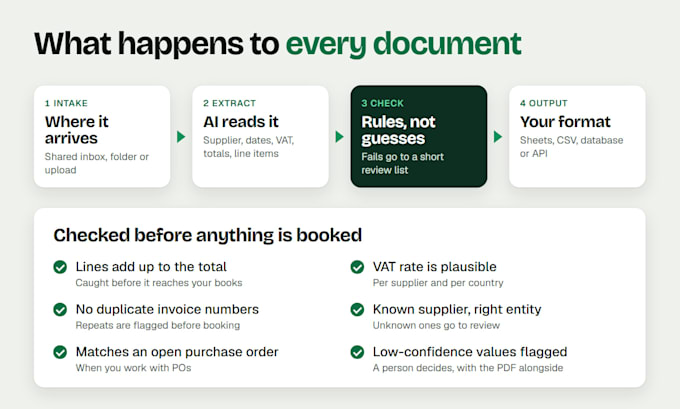
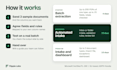
I build invoice data extraction with AI and OCR. It reads your supplier invoices, receipts and statements, pulls out the fields you need and writes them to Google Sheets, CSV, a database or your accounting software. When the AI is unsure about a value, the document goes to a review list with the reason attached, and a person checks it before it reaches your books.
What you get:
- Intake from a shared inbox, a folder or an upload page
- Fields mapped to your own column names: supplier, invoice number, dates, VAT, totals, line items
- Rules that do not rely on AI: lines add up, VAT is plausible, no duplicate invoice numbers
- A review list for exceptions, with the original PDF next to the extracted values
- Output to Sheets, CSV, a database, an accounting import file or an API
I am a Microsoft certified data analyst (PL-300) with more than 5 years in data and business analysis, based in the Netherlands.
Attach 3 sample documents to your order so I can confirm the fields first.
From Raw Data to Real Insight
Level 2
Languages
How accurate is the extraction?
Clean digital invoices come through well. Scans, credit notes and multi-page line items are where any AI makes mistakes, so every document also passes rules that do not depend on AI. Anything that fails goes to a review list instead of into your data.
What can it read?
Supplier invoices, receipts, bank statements, delivery notes and order confirmations, as digital PDFs or scans. Send 3 samples and I will tell you which fields can be read reliably before you commit to a bigger package.
Is my data safe, and is this GDPR-friendly?
I am based in the Netherlands and sign an NDA or DPA on request. Processing uses EU regions where the provider offers them, or your own Azure tenant, on API terms that exclude training on your documents where the provider offers that. You decide how long originals are kept.
Can the data go straight into my accounting software?
Yes, through the software's import file or its API, in the format your team already uses. The import file is in the Intake and dashboard package and available as an extra on Automated intake.
Are there running costs after delivery?
For the automated packages, the AI and cloud usage runs on your own accounts and is billed by the provider at cost. I give you an estimate for your volume before I start.
What does the Batch extraction package include?
One batch of up to 200 PDFs of one document type, such as supplier invoices, turned into one clean Google Sheet or CSV with up to 15 fields. Totals are checked and rows that do not add up are flagged. It is a one-off job, not an ongoing automation.
What happens with documents the system cannot read?
They land in the review list with the reason attached, such as a total that does not match or a missing invoice number. Your team decides on those few instead of typing everything.
Do you need access to our email or accounting system?
Only for the automated packages, and only through an account you create for it, such as a shared mailbox or a guest user. We set that up after the order starts. Never send passwords in the requirements form.