Browse categories
Explore
Fiverr Pro
English
$
USD
FullStack Developer, Automation Expert, Moodle and Instructional Design
Level 1
Has met certain performance criteria and shows strong potential in the marketplace.
Are you looking to boost productivity and streamline your workflows? You're in the right place!
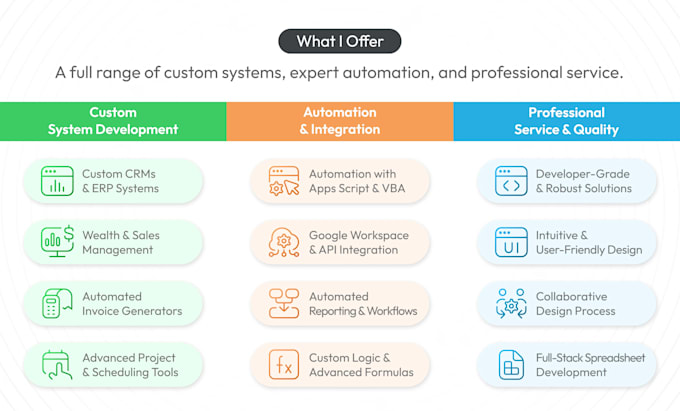
As a Google Workspace (formerly G Suite) expert, I can help you automate repetitive tasks and optimize your work environment. From automating emails to creating custom workflows using Google Apps Script and Google API, I can do it all.
What can I do for you?
Email Automation:
Custom Workflows:
Custom Scripts:
API Integrations:


Platform:
Excel
•
Google Sheets
•
VBA
Development technology:
VBA
•
Google Apps Script
•
Excel
Expertise:
Formatting
•
Forms
•
Formulas
•
Macros
•
Dashboard
1. What is Google Workspace automation?
Google Workspace automation refers to using Google Apps Script, Google API, and other automation tools to streamline and automate repetitive tasks in Google Workspace apps (like Gmail, Google Sheets, Google Drive, and Google Calendar). This can include automating email workflows, creating custom.
2. What kind of tasks can I automate in Google Workspace?
You can automate a wide range of tasks, including: Sending scheduled emails or auto-replies. Managing and organizing emails with custom filters. Creating automated Google Forms and Sheets workflows. Integrating Google Sheets with other apps like Slack, Trello, or Salesforce.
3. Do I need technical knowledge to use these automations?
No, you don’t need to have technical knowledge. I will take care of setting up everything for you, and I can also provide you with user-friendly documentation or training to ensure you can easily use and maintain the automations.
4. Can you integrate Google Workspace with other tools I use?
Yes! I can integrate Google Workspace with a variety of third-party apps such as: Slack Trello Asana Salesforce Zoom And more! Feel free to reach out if you have a specific integration in mind.
5. How long will it take to complete my project?
Completion time varies depending on the complexity of the tasks. For basic automations, it may take just a few hours, while more complex workflows and API integrations could take a few days. You will receive an estimated delivery time after I review your requirements.