Browse categories
Explore
Fiverr Pro
English
$
USD
Expert IT Support Specialist, Software Installation, Windows, Mac
I provide fast, reliable, and 100% secure remote software installation and technical configuration for all Adobe Creative Cloud apps. Whether you are on Windows 10/11 or macOS (Intel, Apple Silicon M1, M2, M3, M4), I will get your creative workstation set up and running at peak performance.
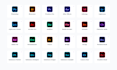
Adobe Photoshop
Adobe Illustrator
Adobe InDesign
Adobe Premiere Pro
Adobe After Effects
Adobe Lightroom
Adobe Lightroom Classic
Adobe Acrobat Pro DC
Adobe Audition
Adobe Media Encoder
Adobe Animate
Adobe Character Animator
Adobe XD
Adobe Dreamweaver
Adobe Fresco
Adobe Bridge
Adobe InCopy
Adobe Premiere Rush
Adobe Substance 3D Painter
Adobe Substance 3D Designer
Adobe Substance 3D Stager
Adobe Substance 3D Sampler
What This Service Covers:
100% Safe, Secure & Transparent

Software type:
Workspace
•
Control Panels
•
VPN
•
Other
How will you install the software on my computer?
I use secure remote desktop software like AnyDesk or TeamViewer. You can sit back and watch every action on your screen in real time.
Do you support Apple Silicon Macs (M1/M2/M3/M4)?
Yes! I support all macOS versions (Sonoma, Ventura, Monterey) on both Intel and Apple Silicon Macs, as well as Windows 10 and 11.
What if the installation fails or shows an error code?
I specialize in clearing residual corrupt registry files, cache conflicts, and licensing errors (such as Error 183, Error 501, etc.) to ensure a clean, successful setup.
Do I need to be in front of my computer during the process?
You only need to open the remote connection tool (AnyDesk/TeamViewer) and grant permission. After that, you can monitor the session.


