Browse categories
English
$
USD
Connect to your AI
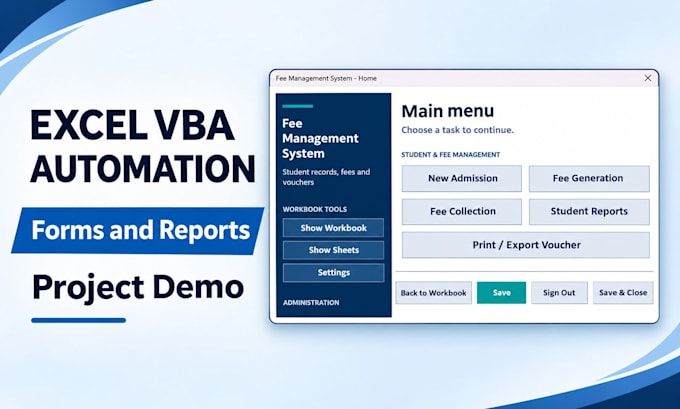
Excel VBA Automation, Data Entry Forms and Reports
I will build Excel VBA data entry forms and automated reports for Windows desktop Excel.
Organise records, reduce repetitive typing and generate reports through a clear, practical workflow.
BASIC: One UserForm with up to 8 input fields, Add/Clear buttons, required-field checks and one data table.
STANDARD: One UserForm with up to 12 input fields, Add/Search/Update buttons, validation, one data table and one worksheet report.
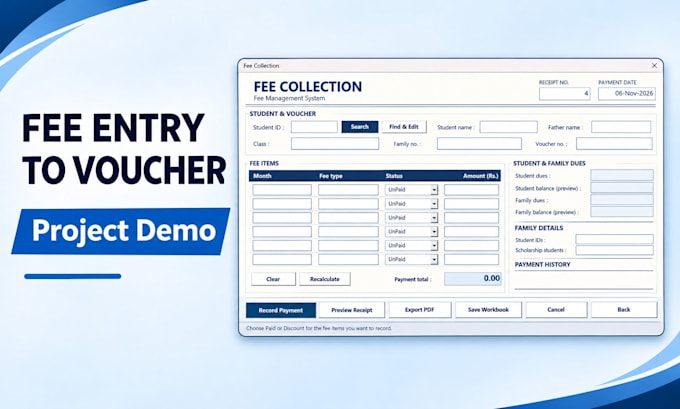
PREMIUM: Up to two UserForms with 15 input fields each, Add/Search/Update/Clear buttons, validation, two data tables, one worksheet report and one PDF export layout.
You receive an editable XLSM workbook, readable VBA code and brief instructions. I test the agreed workflow using your sample data.
Full school systems, payroll engines, external integrations and additional features require a separate quote.
Please send your workbook, Excel version and expected result before ordering. Revisions cover the agreed requirements; new features cost extra.


Technology:
Excel
•
VBA
Which Excel version do I need?
This Gig is for Windows desktop Excel with macros permitted. Please send your Excel version before ordering so I can confirm compatibility. Mac, browser, mobile and Google Sheets versions are outside this Gig.
Can you work on my existing workbook?
Yes, if the workbook and its relevant VBA code are accessible and the changes fit the selected package. Send a copy with sample data first so I can check its structure and requirements
What is included in the Basic package?
One new data entry form with up to 8 fields, Add and Clear buttons, required-field checks and one destination table in one workbook. Search, update, reports and PDF output belong to higher packages.
What will I receive?
A macro-enabled XLSM workbook, editable VBA source code and brief written instructions. The deliverable will be checked against the agreed sample inputs and expected results.
What counts as a revision?
A revision is one round of adjustments within the agreed scope, such as labels, layout or an agreed validation rule. Extra forms, fields beyond the package, new reports or changed workflows need a separate agreement. Defects against the agreed requirements will be corrected.
Can you create fee vouchers or salary slips?
Premium can include one PDF output layout, such as a voucher or salary slip, using agreed workbook data and calculation rules. Complete fee management or payroll systems require a separate scope and quote.
What information do you need to begin?
Your sample workbook or field list, Excel version, button actions, validation rules and an example of the expected output. Please replace personal or confidential records with sample data.
Can several users work in the file at once?
These packages cover one user working in one Excel workbook at a time. Shared simultaneous editing, external databases, APIs and online systems are outside the package scope.
What counts as an input field?
An input field is a control where the user enters or selects information, such as Name, Date, Class or Amount. Labels and buttons do not count. Calculated outputs must be agreed before ordering.
What does one PDF layout include?
One PDF layout means one agreed worksheet template that can be exported to PDF, such as an invoice, voucher or summary report. Additional templates, batch exports and automatic emailing require a separate quote.