Browse categories
Explore
Fiverr Pro
English
$
USD

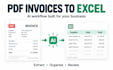
Turn PDF invoices into an Excel spreadsheet without copying each field yourself.
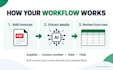
I will build a reusable AI invoice agent that extracts supplier, invoice number, date, tax and total into your chosen Excel columns.
Choose your setup:
- Basic: add PDFs to a local folder and start the agent yourself. Includes 1 invoice layout, up to 8 columns and 10 sample tests.
- Standard: automatically process PDFs from 1 online folder. Includes 3 layouts, up to 12 columns and line items.
- Premium: automatically process invoice attachments from 1 inbox. Includes 5 layouts, up to 15 columns, line items and duplicate flags.
You receive the working workflow, source files, an Excel template and a setup guide. Standard and Premium include a walkthrough.
A layout means one invoice design. Test counts cover setup samples, not future use. Missing fields and failed checks are flagged; review important values before use.
The price covers setup. Any AI, tool or hosting fees are separate and agreed before work starts.
Send sample PDFs and your desired columns before ordering. Clear printed English PDFs are the starting scope; scans need a sample check.
Full Stack AI Developer, AI Agents, Automation and Integrations
Languages
What will I receive?
A reusable workflow, source files, an Excel template, sample test results and a setup guide. Standard and Premium include a walkthrough. It processes the agreed source, invoice layouts and output columns.
Which package should I choose?
Basic: one local input folder and manual start, 1 layout and 8 columns. Standard: one monitored online folder, 3 layouts and 12 columns. Premium: one inbox, 5 layouts and 15 columns. Standard and Premium support line-item columns. Each tier uses one source.
Can you work with scanned invoices and line items?
Please share scans before ordering so I can check readability. Faint text, handwriting or damaged pages may need manual review. Standard and Premium can extract line items within their column limits. Clear printed English PDFs are the starting scope.
Will every extracted value be correct?
Missing fields and failed checks are flagged. Standard and Premium can compare subtotal plus tax with total. Premium flags repeated supplier/invoice-number pairs and emails processing errors. These checks cannot detect every error; review important values before use.
Are there ongoing costs or limits on future invoices?
The price covers setup. You own the running accounts and pay any required AI, OCR, tool, hosting or Microsoft fees, agreed before development. Package test counts cover supplied setup samples, not future use. Provider limits and running costs still apply.
What do revisions and support cover?
Revisions cover changes within the agreed layouts, columns and source. Basic and Standard include 7 days of fixes for delivered-workflow issues; Premium includes 14. New suppliers, features, dashboards or accounting integrations require a separate scope.
How does the starter package work?
Add PDFs to a folder on your computer and start the agent manually. It reads one invoice design and writes up to 8 agreed columns to Excel. You receive the reusable workflow, source files and a setup guide. We test up to 10 supplied invoices and confirm any running costs before development.


