Browse categories
Explore
Fiverr Pro
English
$
USD




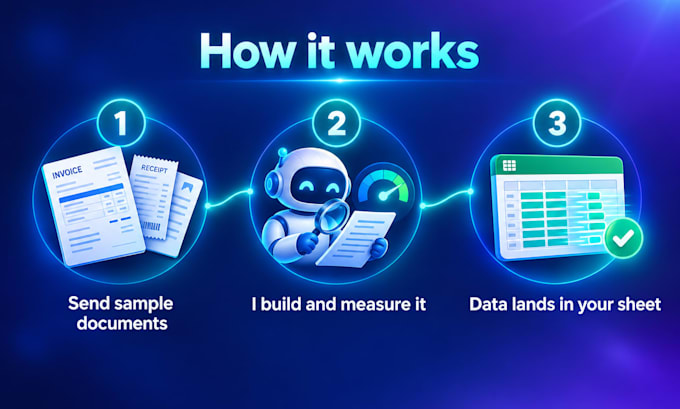
Still typing invoices into spreadsheets by hand? I will build an AI automation that reads your invoices, receipts and PDFs and puts the data where you need it.
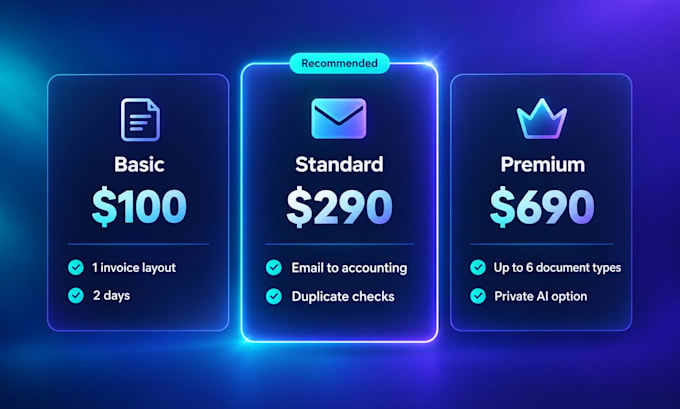
You get:
Invoices are one example. If you repeat a task on a computer every day, like sorting emails, renaming files or building weekly reports, I can automate it too.
Why me: I am a software engineer with 7+ years of experience, and I built a live invoicing app with an AI assistant.
Send me 3 sample documents (hide private details if you like) and I will show you what the AI pulls out before you order.
Computer Scientist, Software Engineer for 7 years, artist for life
Languages
Do I pay for the AI separately?
Yes. The automation uses your own Claude or OpenAI account, which usually costs a few cents per document. For documents that must stay private, add the Private AI model extra and nothing is sent to an AI company.
What documents can it read?
PDFs, scanned images, photos of receipts, emails and spreadsheets. Clear printed documents work best. Handwriting works but is less accurate, and the accuracy report will show you how well.
How accurate is it?
I measure it on your own sample documents and give you a report for each field. Anything the AI is unsure about goes to a review list instead of straight into your books.
Which apps can it send data to?
Google Sheets, Excel, CSV, QuickBooks, Xero, Airtable or a database. If you use something else, message me and I will check it first.
Do I need to keep my computer on?
No. I can set it up to run in the cloud on a schedule or whenever a new document arrives in your email or folder. You can also run it by hand if you prefer.
Can you automate tasks other than invoices?
Yes. Sorting emails, building reports, renaming and filing documents, copying data between apps. Message me what you repeat every day and I will tell you which package fits.
Is my data safe?
Your documents stay in your own accounts. I delete my copies after delivery. With the Private AI model extra, the AI runs on your own computer and nothing leaves your office.