Browse categories
Explore
Fiverr Pro
English
$
USD

Level 1

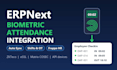
Is your HR team still exporting punches from the biometric machine into Excel? I will connect your attendance device to ERPNext / Frappe HR so every punch lands in Employee Checkin and attendance is marked automatically.
What I do:
Connect ZKTeco, eSSL, Matrix COSEC and other devices with an SDK or API
Map device user IDs to ERPNext employees
Scheduled auto sync, no manual export
Shift types, auto attendance, late entry and early exit rules
Multiple devices and multiple locations
Handle missed punches and duplicate entries
Test on your real data and share a short handover note
Why me: 60+ ERPNext projects with a 4.9 rating. I have built attendance integrations that pull device punches into ERPNext, with a dry-run preview before anything is written.
Please message me before ordering with your device brand/model, ERPNext version, and whether you use Frappe Cloud or a self-hosted server.
ERPNext Full Stack Developer
Level 1
Languages
Which biometric devices do you support?
ZKTeco and eSSL (the most common), Matrix COSEC, and other brands that offer an SDK, a cloud API or a data export. Send me your model before ordering and I will confirm it works.
Does it work with Frappe Cloud?
Yes. On Frappe Cloud, a small sync tool on your office network or the vendor's cloud API pushes punches to ERPNext. Self-hosted servers can also pull directly from the device.
Will attendance be marked automatically?
Yes. Punches become Employee Checkin records, and with shift types and auto attendance set up, ERPNext marks Present, Absent, Half Day, late entry and early exit for you.
What do you need from me to start?
Device brand and model, network access (device IP or cloud login), your ERPNext version, System Manager access to your site, and your shift timings.
