Browse categories
Explore
Fiverr Pro
English
$
USD
Automation and Web Developer
Every invoice that arrives in your inbox becomes a row in your spreadsheet. No copying, no typing.
How it works:
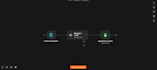
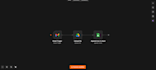
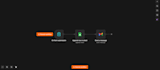
A new email arrives. The automation reads the invoice, takes the date, the supplier name, the amount and the invoice number, and writes them into your Google Sheet. The PDF is saved to your Google Drive and linked in the same row.
It runs in n8n on your own accounts. You keep full access and can change every step yourself.
It works with PDF invoices and with invoices written in the body of the email.
I do not need your password. You connect your Google account yourself through the standard Google permission screen.
Technology:
Excel
•
Google Sheets
•
Other
Do I need to give you my email password?
No. You connect your Google account yourself through the standard Google permission screen. I never see your password.
What if invoices come from many different suppliers?
That is fine. Each invoice is read separately, whatever the layout is.
Where does it run after you deliver it?
In n8n on your own account. It keeps running after the order is closed.
Can you add other columns?
Yes. Tell me which fields you need and I will add them.
What happens if an invoice cannot be read?
The row is still created and marked, so you can fill it in by hand. Nothing is lost.


