Browse categories
Explore
Fiverr Pro
English
$
USD
Web Application Developer
Spending time copying spreadsheet data, sending routine emails or preparing reports?
I will automate Google Sheets workflows using Google Apps Script to reduce repetitive work.
Depending on your package, I can:
BASIC: One task in one spreadsheet, up to two tabs, with one manual or scheduled trigger.
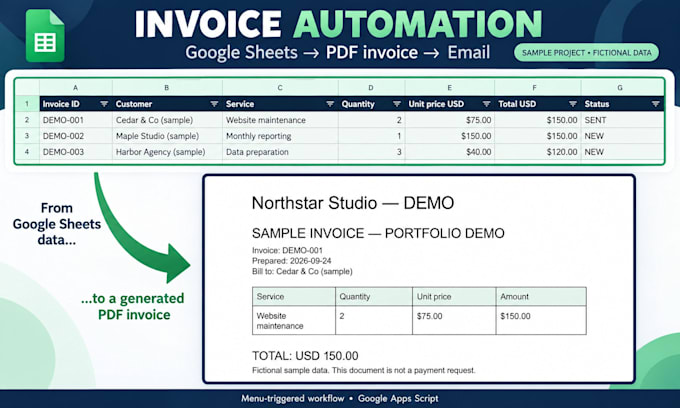
STANDARD: One workflow with one trigger and up to three actions, connecting Sheets with up to two additional Google tools.
PREMIUM: One API endpoint imported into one spreadsheet on a schedule, plus up to two follow up actions. API key or existing access token required.
Every package includes source code, sample data testing and setup instructions. Cleanup covers only fields used in the workflow.
Please message me with your workflow, sample data and desired result before ordering so I can confirm the scope. Custom OAuth setup, two way sync and additional endpoints require a separate quote. Paid services are not included.


Technology:
Google Sheets
Which package should I choose?
Choose Basic for one task inside a spreadsheet. Choose Standard for a workflow connecting Google tools, such as Forms, Sheets and Gmail. Choose Premium for a scheduled import from one external API endpoint. Send me your process if you need help choosing.
What do you need to get started?
Please provide your current process, the result you want, a sample spreadsheet with sensitive information removed, and any email or PDF template involved. For API work, include the documentation. We will confirm the necessary access before development.
What counts as a trigger or an action?
A trigger starts the workflow, such as a form submission or a daily schedule. An action is one agreed operation, such as updating spreadsheet rows, generating a PDF or sending an email. We will define the exact steps before starting.
Which API integrations are included?
Premium includes importing data from one documented API endpoint using an API key or an existing access token. Custom OAuth setup, two-way synchronization, additional endpoints and complex data processing require a separate assessment and quote.
Will the automation run while I am offline?
Scheduled and event-triggered workflows can run without your browser being open. They depend on valid permissions, service availability and Google Apps Script quotas. Manually triggered workflows require you to start them.
Will I receive the source code and instructions?
Yes. Every package includes the Google Apps Script source code, testing with sample data and instructions for setup and everyday use. The workflow will be configured to run under your Google account with the required permissions.
What does a revision include?
A revision is a round of adjustments within the agreed requirements. Additional tools, new actions or a different workflow are extra scope and may require a separate quote. Please provide your requested changes together.
Are subscriptions or ongoing maintenance included?
Third-party subscriptions, paid API usage and ongoing maintenance are not included. Any required paid services will be discussed before work begins. Future changes caused by new requirements or external service updates can be quoted separately.