Browse categories
English
$
USD
Connect to your AI
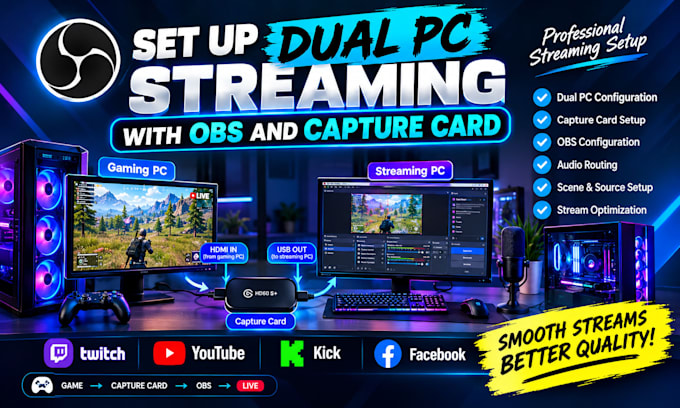
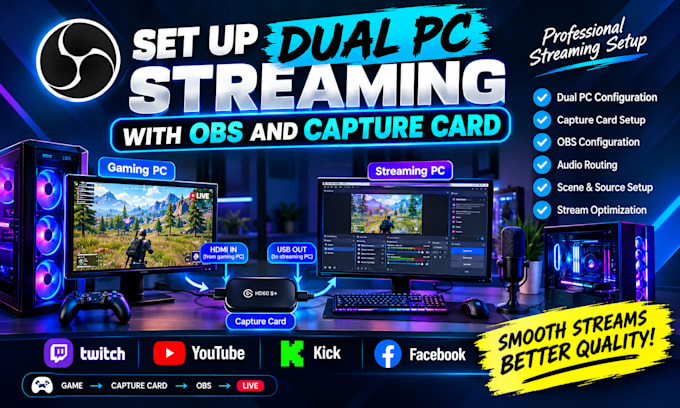
Want to achieve smooth, professional gaming streams with a dual PC setup? I'll help you configure OBS Studio and your capture card for a reliable streaming experience.
Whether you're a beginner or an experienced streamer, I'll help connect your gaming PC and streaming PC, configure video and audio sources, and optimize your OBS settings.
My Services Include:
Why Choose Me?
I can help prepare your setup for platforms like Twitch, YouTube, and Kick.
Before ordering: Please provide your PC specifications, capture card model, microphone or audio setup, and streaming platform.
Let's get your dual PC streaming setup ready for your next stream!
Software:
OBS Studio
Platform:
•
Twitch
•
YouTube
•
Kick
1. What do I need for a dual PC streaming setup?
You generally need a gaming PC, a streaming PC, a compatible capture card, OBS Studio, and the required video and audio connections.
2. Can you configure my capture card with OBS Studio?
Yes. I can help configure a compatible capture card in OBS, including video sources, resolution, frame rate, and audio settings.
3. Can you fix audio problems between my two PCs?
Yes. I can troubleshoot common audio routing issues involving game audio, microphones, and streaming audio, depending on your hardware and software.
4. Which streaming platforms do you support?
I can help prepare your OBS setup for Twitch, YouTube, Kick, and other platforms supported by OBS Studio.
5. Do I need to purchase a capture card before ordering?
Ideally, yes. Please share your capture card model before ordering so I can check compatibility with your computers and intended setup.
6. Can you optimize my stream quality and performance?
Yes. I can help adjust OBS output resolution, frame rate, bitrate, and encoder settings based on your hardware, internet connection, and streaming platform.
7. What information should I provide before you start?
Please provide your PC specifications, capture card model, OBS version, microphone and audio setup, streaming platform, and a brief description of your goals.