Browse categories
English
$
USD
Connect to your AI


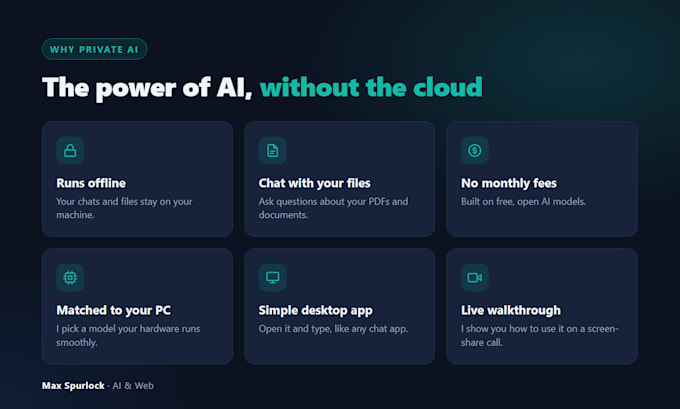
Run a local AI assistant on a computer you own, with a setup matched to its hardware.
Please send your operating system, RAM, processor and graphics card before ordering. I'll confirm a suitable app and model. Installation and model downloads need internet access and enough disk space.
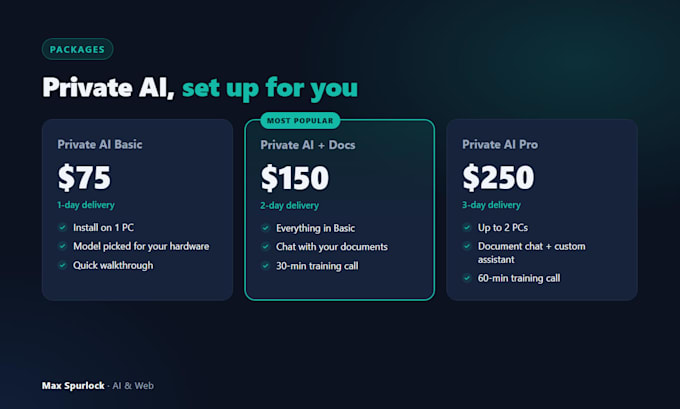
BASIC: one app and one local model on one compatible computer, with a basic walkthrough.
STANDARD: Basic plus local document chat using up to 3 files (up to 20 pages total) and a 30-minute walkthrough.
PREMIUM: setup on up to 2 computers, one custom assistant, up to 5 files (20 pages total) and a 60-minute walkthrough.
We'll test the agreed local workflow with internet disconnected. That workflow uses a local model rather than a paid cloud AI API. Other apps, backups, telemetry and remote support can have separate data-sharing settings; this is not a device-wide privacy certification.
You keep control during screen-share. Paid software, hardware upgrades, large data migrations and ongoing support are outside the package. AI answers need human review.
AI chatbots and websites for small businesses
Languages
Will it work on my computer?
Compatibility and speed depend on your operating system, RAM, processor, graphics hardware and free storage. Send those details before ordering. I will confirm a suitable model and any limitations before accepting the setup. Hardware upgrades are not included.
Is it really private?
The agreed model and document-chat workflow run locally and are tested offline. Initial downloads need internet. Other apps, backups, telemetry and the remote support session have their own privacy settings, which we will discuss. AI answers still need review.
How do you install it remotely?
We use a screen-share session where you stay in control. You can watch everything I do and end the session any time.