Browse categories
Explore
Fiverr Pro
English
$
USD


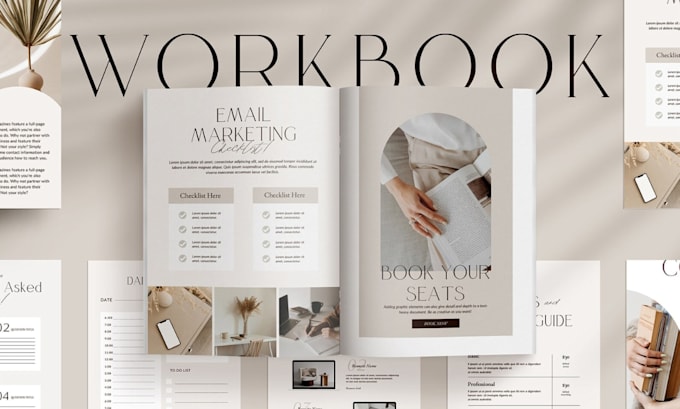
Coaches and course creators waste hours building webinar slides, coaching workbooks, and online course PDFs from scratch only to end up with designs that look inconsistent, unprofessional, or impossible to edit. If you've ever struggled to match your brand across a canva workbook, course template, and presentation design all at once, this gig solves exactly that.
I design fully editable canva templates built specifically for educators, coaches, and digital product sellers. Every deliverable whether a digital workbook, webinar template, canva coaching deck, or course slides is structured for clarity, branded for consistency, and ready for you to customize without design experience.
You get a pdf template you can distribute immediately, canva pdf files your clients can fill in or follow along with, and an editable template system you can reuse across every program, launch, or webinar you run.
No placeholder fluff. No locked elements. Just clean, professional canva templates your audience will take seriously from slide one.
Send me your brand colors, your program name, and what you're building; workbook, webinar deck, or full online course kit and i will get it done faster.
Please inform the freelancer of any preferences or concerns regarding the use of AI tools in the completion and/or delivery of your order.
Shopify
Languages
Can I use this template for multiple coaching programs or do I need to buy a new one each time?
Once delivered, the Canva template is yours to reuse across as many programs, cohorts, or launches as you want. Duplicate the file in Canva, swap the module titles, and you have a brand new workbook in minutes.
I sell on Gumroad and Etsy. Will this template work as a digital product I can resell to my own audience?
Yes. The delivered PDF is ready to list as a digital download immediately. The Canva file lets you create multiple versions targeting different niches, price points, or audiences from one base template.
My webinar runs on Zoom, Kajabi, and I repurpose content on Instagram, can one template cover all three?
Absolutely. The slides are designed at 16:9 for screen sharing, exportable as PDF for workbook distribution, and individual slides export as PNG for Instagram carousels. One template, three content channels covered.
I have a co-coach and we want consistent branding across both our materials. How does that work?
Share the Canva template link with your co-coach directly. Both of you can edit, duplicate, and build from the same master file simultaneously without version conflicts.
Will this template still look professional if my audience compares it to courses on Teachable or Kajabi?
The layouts are built to match the visual standard buyers expect from paid platforms, structured content blocks, consistent typography, and clean hierarchy that holds up against any course hosted on Teachable, Kajabi, or Thinkific.
I run live webinars monthly. Can I update the template myself each time without hiring a designer again?
That's exactly what it's built for. Every text block, color, and image placeholder is fully unlocked. Change your module titles, update your dates, swap your headshot; no design skills needed, no designer required.
I want to turn my workbook into a lead magnet and also sell an upgraded version. Is that possible with one file?
Yes. Deliver a condensed 5-page version as your free lead magnet and use the full template as your paid product. Same brand, same design system, two revenue touchpoints from one Canva file.
I'm planning to eventually hire a VA to manage my content. Will they be able to work inside this template without breaking anything?
Yes. The template is built with locked background elements and editable foreground layers, so a VA can update content without accidentally moving or deleting your core design structure.