Browse categories
Explore
Fiverr Pro
English
$
USD


Your viewers always ask what song is playing - show them, live.
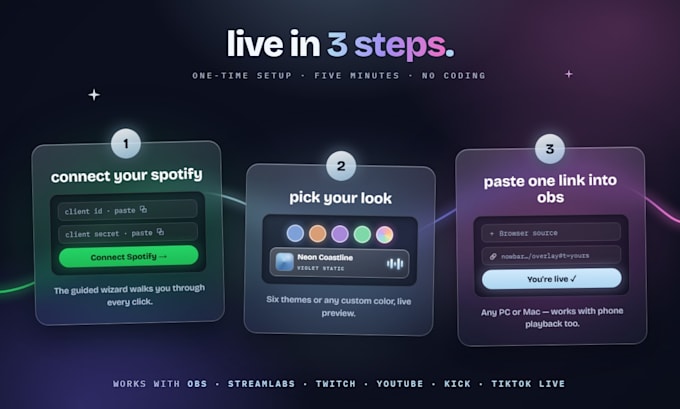
NowBar is a frosted-glass "now playing" bar for your stream: album art, title, artist, progress bar, and a pulse that moves with the music.
Why streamers pick it:
- Fully hosted. No downloads, no plugins. One link pasted into OBS as a browser source.
- Phone playback counts - it updates wherever you press play.
- Your own keys, so nobody can switch your overlay off.
- 6 designer themes, or any custom colour.
- OBS, Streamlabs, Twitch, YouTube, Kick, TikTok Live. PC or Mac.
PICK YOUR PACKAGE
THE OVERLAY ($5) - the overlay plus an illustrated setup guide. Self-serve: you follow the steps yourself, about 10 minutes. No support included.
WHITE-GLOVE ($10) - I do it with you over messages: every click walked through, styled to your look, confirmed live before I deliver.
CUSTOM THEME ($25) - white-glove plus a palette matched to your brand, and priority support.
Setup needs Spotify Premium (Spotify's rule for app owners) and a few minutes making a free Spotify developer app. I guide you through that on White-Glove and above.
Not affiliated with Spotify. Questions? Message me first.
Please inform the freelancer of any preferences or concerns regarding the use of AI tools in the completion and/or delivery of your order.
Developer of streaming overlays, OBS setup and custom web tools
Languages
Can this control or change anything on my Spotify account?
No. The overlay can only see what you're currently playing. It can't touch playback, playlists, or your account - the permission it asks for is read-only.
Does it work when I play music from my phone?
Yes - that's the best part. It reads your Spotify account directly, so it updates no matter where you press play: phone, tablet, desktop app, or another computer.
What's a Spotify developer app? Is it free?
It's a free key Spotify gives you that lets the overlay read your now-playing info. Creating one takes about 3 minutes of clicking and I guide you through every step. Because it's yours, your overlay can never be shut off by a third party.
Do I need Spotify Premium?
Yes. Since 2026, Spotify requires app owners to have a Premium subscription. Free-tier accounts can't complete setup - that's Spotify's rule and I can't work around it.
Mac or Windows?
Both. Nothing is installed on your computer - the overlay is a hosted link you paste into OBS as a Browser source, so your OS doesn't matter.
How long does setup take?
About 10 minutes, one time. After that your link works forever - new PC, reinstalled OBS, doesn't matter.
What if my overlay stops working later?
Message me. Reconnecting takes under a minute with the setup link you'll already have, and I'll help you do it.
What happens if we can't get it working?
If I can't get you up and running, I'll cancel the order for a full refund per Fiverr's policy. The setup is genuinely simple though.