Browse categories
English
$
USD
Connect to your AI



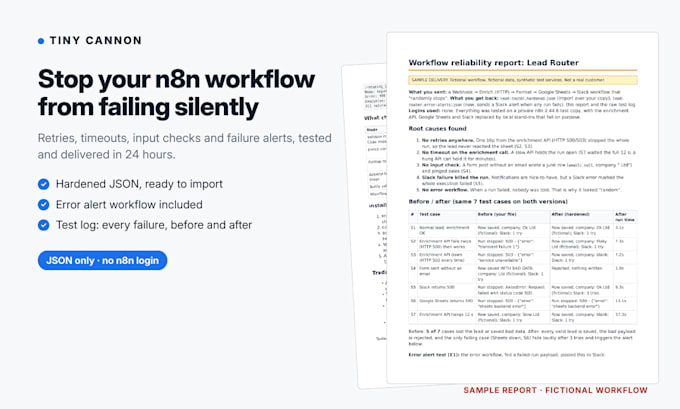
Make an existing n8n workflow reliable: retries, timeouts, input checks and Slack or email alerts when a run fails. 24-hour delivery.
No logins needed: export your workflow JSON and send it. You get a hardened JSON back, ready to import.
Fixes for workflows that "randomly stop":
- One API blip kills the whole run, so the lead or order never arrives
- No timeout, so a slow API hangs the run
- Bad input (missing email, empty field) crashes a node or writes junk rows
- A Slack or email failure fails the whole run
- Nobody gets told when a run fails
What you get:
- Hardened workflow JSON with retries, timeouts, fallbacks and safe expressions
- A separate error workflow that alerts you with the node, the error and a link to the run
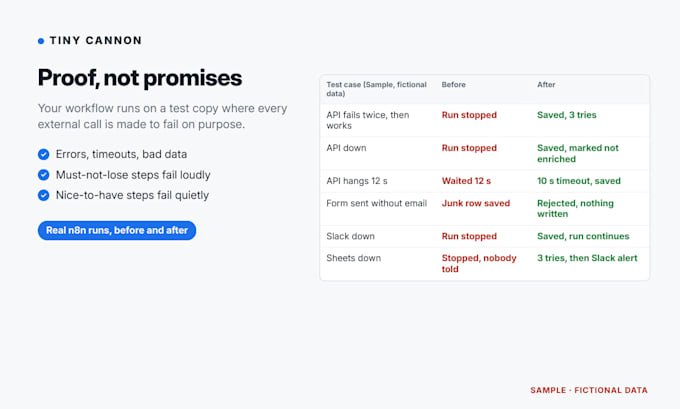
- A test log: every external call made to fail on purpose (errors, timeouts, bad data), before vs after
- Install steps (about 5 minutes) and a node-by-node change list
Scope: n8n only (Cloud or self-hosted), existing workflows. Not Make or Zapier, not new builds. Not sure? Message me with the node count first.
I never ask for your n8n login or API keys. Exports leave your credentials behind.
I find why your Shopify orders and GA4 purchases don't match
Languages
Do you need access to my n8n?
No. In n8n open the workflow, then the ... menu, then Download, and attach the JSON. n8n exports don't include your credential secrets, only their names. After import you reselect your credentials on the changed nodes.
How do you test without my accounts?
I run a test copy on my own n8n with your apps replaced by stand-in services that fail on purpose: server errors, timeouts, bad data, alerts failing. Your real nodes and settings stay as they are. The test log shows each case before and after.
Which n8n versions work?
n8n Cloud and self-hosted, version 1.x or newer. Tell me your version (Settings, then About n8n). I keep your node versions and only use options your version has, so the file imports cleanly.
What counts as a node?
Every box on the canvas, including the trigger. Sticky notes don't count. A 12-node limit means 12 nodes before my changes. Helper nodes I add don't count.
Will you change what my workflow does?
No. The business logic stays the same. I add retries, timeouts, input checks, fallback paths and alerts. Anything that looks like a logic bug is listed in the report for you to decide, not changed silently.
Can you build a new workflow from scratch?
Not in this gig. It is for existing workflows that work sometimes and fail sometimes. Make and Zapier are also out of scope.
Is this done with AI?
Yes. AI tools do most of the reading and editing, and every change ships only after automated checks pass (the JSON imports into n8n and every failure test runs). The test log shows the results.
Where do the alerts go?
Slack or email by default, through the error workflow included in every package. Telegram, Discord or Teams work too if you have that node in n8n. You pick the channel in the requirements.
What if my workflow has secrets inside it?
If a Code or HTTP node has an API key typed in, please replace it with a placeholder before sending. If I find one, I flag it in the report and move it to a credential reference. Rotate any key that was shared.
Why 24 hours?
Hardening one workflow is focused work: read it, add protections, then run the failure tests. If your JSON is complete and the requirements are filled in, Basic and Standard are delivered within 24 hours.