Browse categories
Explore
Fiverr Pro
English
$
USD
Document data extraction into clean Excel
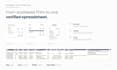
I turn stacks of PDFs into clean, structured Excel data.
Send me your documents invoices, receipts, statements, reports and you
get back a ready-to-use Excel or CSV file with exactly the fields you need.
WHAT MAKES THIS DIFFERENT
Most data entry is typed by hand, which means silent mistakes. I run your
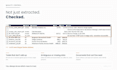
documents through an automated pipeline and verify the results: amounts are
checked against each other, dates are normalized, and any record that doesn't
add up gets flagged. You always know which rows to trust.
WHAT YOU GET
- Excel (.xlsx) or CSV, your choice
- Fields you specify: dates, document numbers, suppliers, amounts, anything else
- A flag column marking records that failed the checks
- Consistent formatting across every document
GOOD TO KNOW
- Works with text-based PDFs. Scanned or handwritten documents are not covered.
- Send me a sample first and I'll tell you honestly whether I can help.
- Processing runs through an AI-based pipeline. Files are deleted after delivery.
Background in business administration and data analysis. Message me with your
document type and volume and I'll suggest the right package.

Tool:
Excel
•
Google Sheets
•
Word
•
PDF editor
Can you handle scanned documents?
Currently I work with text-based PDFs — files created digitally rather than scanned. If you're unsure, send me one sample and I'll check it in a few minutes and tell you honestly.
What if my invoices all look different?
That's the normal case and not a problem. The extraction adapts to different layouts instead of relying on fixed templates, so mixed suppliers are fine.
Which fields can you extract?
Anything that appears in the document: dates, document numbers, supplier names, net and gross amounts, tax, due dates, line items. Just tell me what you need in the sheet.
What happens to my files?
They are used only to complete your order and deleted after delivery. If you need sensitive data removed beforehand, that's fine — just send what's necessary.


