Browse categories
English
$
USD
Connect to your AI
Python Excel and CSV automation, Dutch and English SEO content
WordPress pages "not indexed" in Search Console, or sitemap errors? I find the technical cause and fix what's in the way.
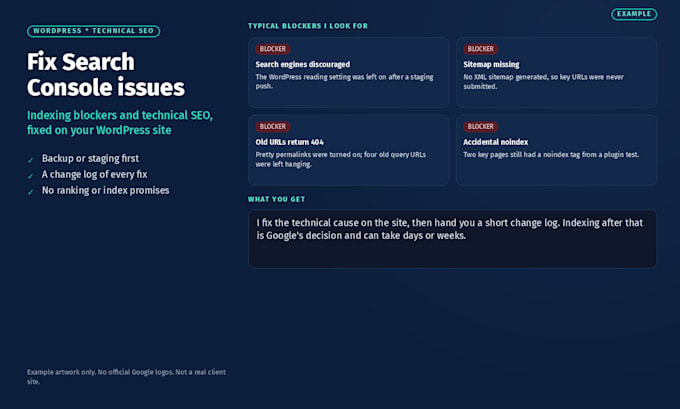
Common causes I check and fix:
- noindex settings, robots.txt and "Discourage search engines"
- XML sitemap: redirects, 404s and noindex URLs that don't belong there
- canonicals, duplicate URLs and redirect chains
- the Search Console reports behind your errors
- Yoast or Rank Math settings
What you get:
- a changelog of every change I make
- before/after notes per issue
- a short report: what I fixed, what I left alone and why
Anything that affects your live site (redirects, noindex, robots.txt) I check with you first.
What I don't promise: rankings, indexing of every page, or a 90+ PageSpeed score. Google decides what it indexes. I remove technical blockers and tell you honestly what's left.
Send me the Search Console message you see before ordering. I need a temporary admin user and, if you have it, Search Console access.
AI may help with drafts, research or code review; I check the work and stay responsible.


Industry expertise:
Marketing & advertising
Language:
Dutch
•
English
SEO services offer implementation of SEO practices only, which may take weeks or months before any results begin to show.
Do you guarantee rankings or that Google will index my pages?
No. I fix technical blockers and, with Search Console access, can request indexing for key URLs. Whether and when Google indexes a page is Google's decision and can take days or weeks. I will not promise rankings, traffic or a full index.
What access do you need?
A temporary WordPress administrator account (don't send your own password) and, if you have it, Search Console access by adding me as a user. Staging is better than the live site. I start with a backup.
Will my live site break?
I take a backup first, or work on staging. Changes go through the SEO plugin, redirects or a child theme or snippet, not WordPress core files. If something I changed causes a problem, I fix it within the order.
Do you use AI?
Yes. AI tools help me review crawl data and draft titles or report text. I check every finding, make the changes on your site myself, and I am responsible for what I deliver.
Does this include new content, backlinks or a new theme?
No. This is technical work on an existing WordPress site. I don't write blog posts, build backlinks, redesign themes or migrate hosts. Speed work is in Premium or the Speed pass extra, with no 90+ score promise.
What if Google still doesn't index a page?
That can happen; indexing is Google's decision. I remove the technical blockers, and if a page stays out, my report says what I think the reason is so you can decide the next step.
Which SEO plugin do you work with?
Yoast and Rank Math. Using something else? Message me first. I won't add a second SEO plugin next to an existing one.
What if Search Console says "Crawled - currently not indexed"?
That status means Google saw the page but chose not to index it. I check technical causes such as canonicals, duplicates and sitemap issues, and fix those. If the cause is thin or duplicate content, I tell you plainly; rewriting content is not part of this gig.
Which package do I need?
Basic if your homepage or a few key pages are missing from Google. Standard if you also want your SEO plugin, titles, meta and 404 redirects sorted. Premium for larger sites, with a speed pass on 3 pages and a 7-day follow-up. Not sure? Send me your Search Console message first.
How long before I see changes in Search Console?
It can take days or weeks; Google recrawls at its own pace. If I have Search Console access, I can request indexing for key URLs after the fixes. I can't speed Google up or promise the outcome. Premium includes a 7-day follow-up check.