Browse categories
Explore
Fiverr Pro
English
$
USD

Level 2


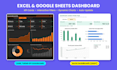



Turn your raw data into a clear, interactive Excel dashboard or Google Sheets dashboard you can read in 10 seconds.
Too many rows, no clear answers? I build dynamic dashboards that show your key numbers on one page, so you can make decisions faster.
What you get:
Perfect for:
Why work with me:
DEMO FIRST: send me a sample of your data and I will make a quick demo of your excel dashboard first. No commitment.
Expert in Excel, Google Sheets and Spreadsheets, Over 10 Years
Level 2
Languages
What do you need from me to build my excel dashboard?
Send your data (Excel, CSV or Google Sheets) and tell me what you want to see, for example sales by month or top products. A sample of your data is enough to start. I will suggest the best layout for your excel dashboard.
Can you build a Google Sheets dashboard instead of Excel?
Yes. I can build an interactive Google Sheets dashboard, an Excel dashboard, or both. If you need both versions, add the Google Sheets version extra or choose the Premium package.
Will my dashboard update automatically when I add new data?
Yes, in the Standard and Premium packages. Just paste new rows into the data sheet and all KPI cards and charts in your dynamic dashboard refresh by themselves. No manual work needed.
Is the demo true? What will I get?
Yes. Send me a sample of your data and I will make a quick demo image of your excel dashboard, with a few KPI cards and one chart. You only order if you like the design. No commitment.
My data is messy. Can you still create a dashboard?
Yes. I can clean, format and organize your data before building the dashboard. Message me first so I can check how much cleaning your data needs.
Which Excel version do I need to use the interactive dashboard?
Excel 2016, 2019, 2021 or Microsoft 365 on Windows or Mac works well. The dashboard uses standard formulas, so no add-ins are needed. A Google Sheets dashboard works in any web browser.
Can you build a KPI dashboard or improve my existing dashboard?
Yes. I can create a new KPI dashboard from scratch for sales, marketing, staff, projects or inventory, or redesign your current excel report so it looks clean, modern and easy to read.
What is the difference between Basic, Standard and Premium?
Basic: 1-page excel dashboard with 4 KPI cards and 4 charts. Standard: more KPIs and charts, filters and auto-update. Premium: 2 dynamic dashboards in Excel or Google Sheets, data cleaning and a video guide.
Can I edit the dashboard myself after delivery?
Yes. You get the full file with no locked sheets. I also explain how to add data, change the month filter and update charts. The Premium package includes a short video guide for your dashboard.
Is my data kept confidential?
Your data is used only to build your dashboard and is not shared with other clients. If your data is sensitive, you can send a version with dummy values and I will build the excel dashboard with that.