What is Vue.js?
Vue is a front-end JavaScript framework used to create user interfaces. Vue integrates directly with HTML, CSS, and JavaScript, making it easy for people with knowledge of these languages to pick it up easily.
Some well-known websites using Vue include:
import { ref } from’vue’const msg = ref(’Hello, World.’){{ msg }}
Enter message: Anyone familiar with HTML, CSS, and JavaScript will immediately feel comfortable with this code and intuitively understand most of it.
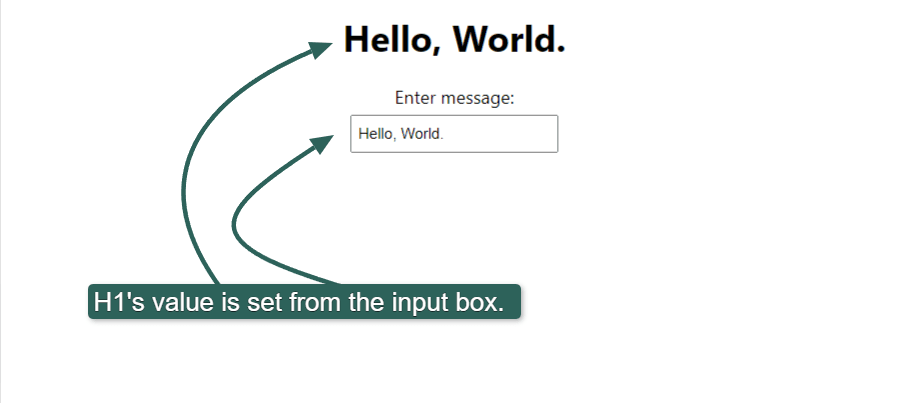
The page’s initial output looks like this:
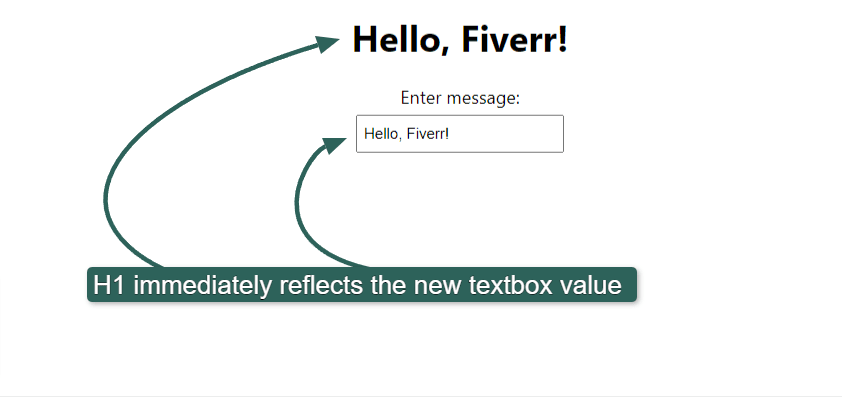
If we edit the textbox’s value to “Hello, Fiverr! the page’s heading changes immediately to show the new value:
This demonstrates one of Vue’s core concepts: Declarative rendering. Vue renders the HTML in real-time, according to programmatic declarations and the current JavaScript state. In the example above, the H1 tag’s value changes when the previously declared msg variable changes.
What is Angular?
Angular is a full-featured JavaScript framework offering a complete solution for developing complex applications. Angular’s learning curve is steeper than Vue’s, and the language is often favored for large enterprise applications.
Some popular websites using Angular include:
Important: Angular isn’t the same as AngularJS. Although Angular is technically the second version of AngularJS, it represents a complete rewrite of the original AngularJS project, and the two are incompatible.
To achieve the same functionality in Angular as in the Vue script above requires several files, and the code is far less intuitive. Technically, you could replicate the above behavior in a single file, but it goes against Angular’s best practices and isn’t workable for larger projects.
Here’s the TypeScript file for our demo app:
helloworld.component.ts code.
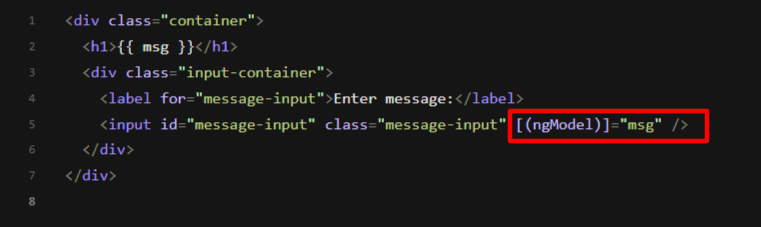
And this is the associated HTML:
helloworld.component.html code.
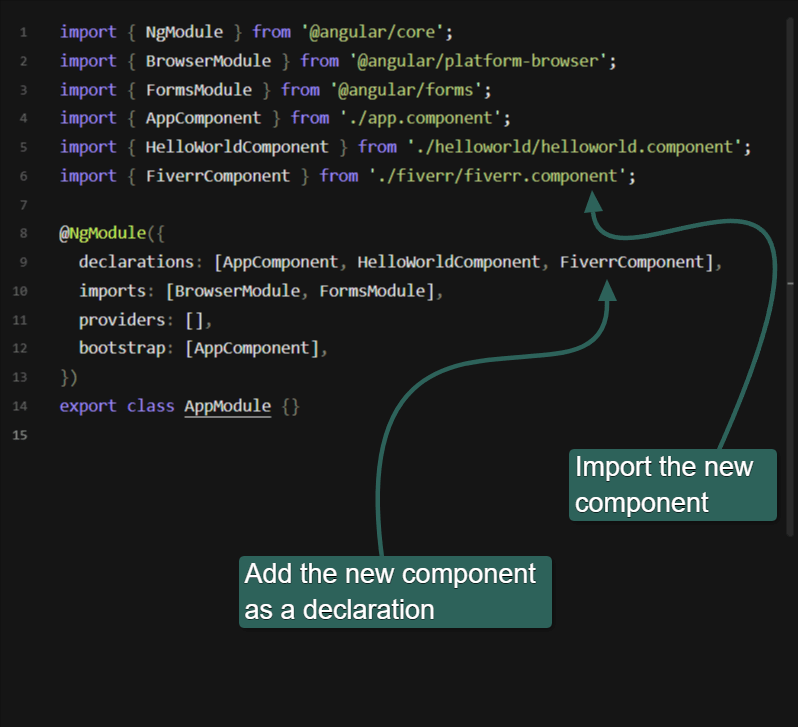
You also have to modify another file called app.module.ts to register the component.
Notice the “ngModel” directive inside the “banana-in-the-box” (“[( )]”) syntax above. In short, this enables two-way data binding in Angular, but the exact reasoning for both the square and curved parentheses requires a fairly detailed discussion. It’s not difficult to learn, but it clearly demonstrates the higher complexity of Angular.
If you’d like to tinker with the above code, you can do so here. Vue also supports a multi-file approach to create components, but this is the exception. In Vue, components are typically created in a single file.
Angular is modular by design, separating code cleanly. The process is excellent for large-scale applications worked on by large teams but can feel inhibitive and claustrophobic for smaller projects.
Angular’s modular nature also makes it well-suited to projects with a frequent developer turnover. Its insistence on modularity means that new developers can easily pick up where a previous developer left off and take over small sections of functionality without learning where it all fits in. The same isn’t true of Vue.
“We’ve found that Vue isn’t a framework to use if you think you’ll have a lot of fresh new developers swapping in to take over writing and managing your app,” says Aron Ezra, chair of the board of Plan A Technologies, a global software consultancy that has worked on hundreds of JavaScript frameworks. “When we’re working on a Vue-based project, we make sure our devs are in constant communication with one another so that the code remains comprehensible to everyone.” Angular and Vue architectures
Angular follows an MVVM architecture. MVVM stands for:
Model: The app’s logic and code.
View: All the visible elements of the app. Loosely, the user interface.
ViewModel: This layer sits between the Model and the View, using binding with user controls to update the view based on user actions or input.
This architecture lets programmers focus on their specific zones and allows for easier scalability. Programmers don’t need to worry about design. But the model also slows the time to get a product to market.
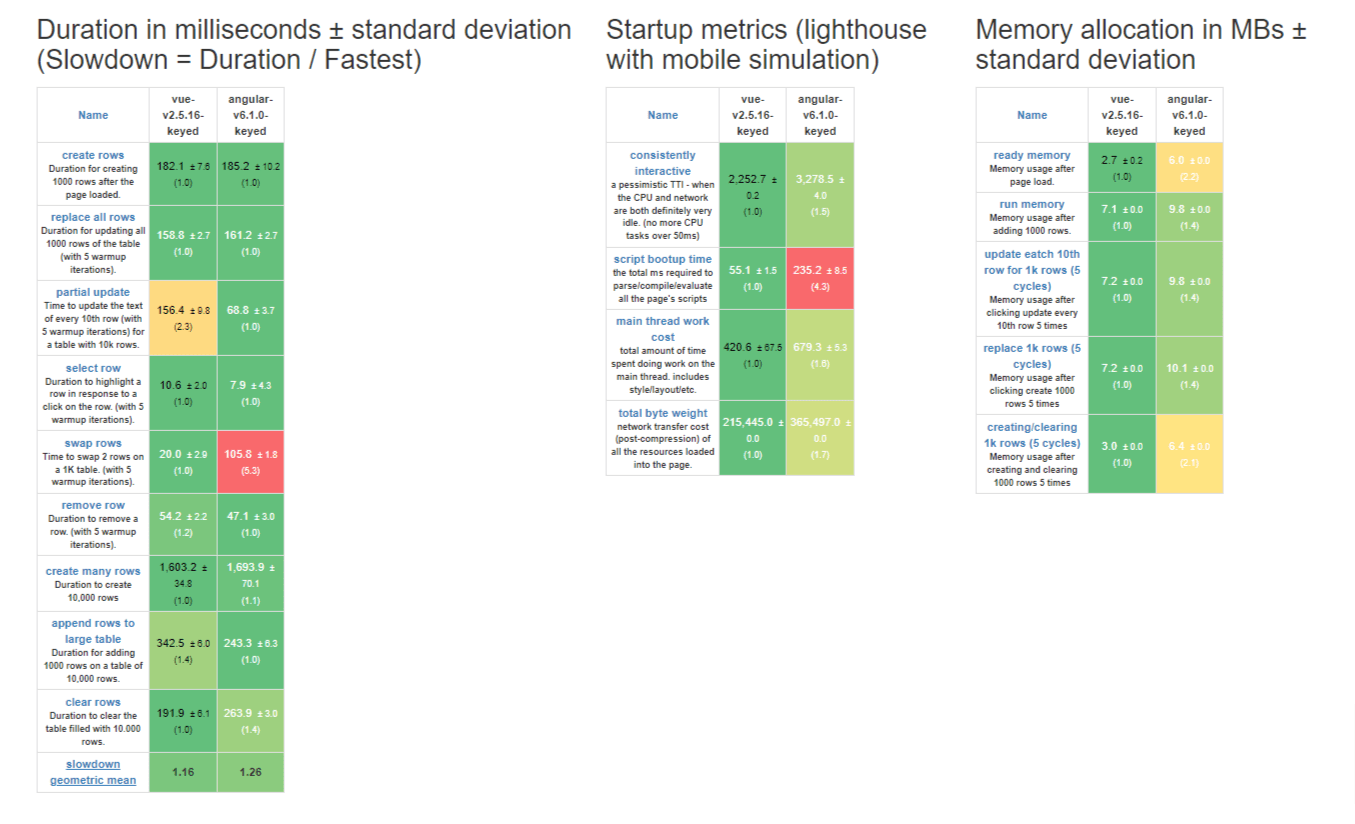
It’s easy to get started casually with Vue, dipping your toes and trying code snippets here and there to get a feel for the language. Angular requires a far more dedicated approach. This possibly explains Vue’s popularity over Angular’s. There isn’t such a thing as “trying Angular.” By the time you’ve learned the basics to try it, you already know much of the framework.
Vue is therefore better suited to web developers who quickly require a new solution for an existing project. Implementing a “quick solution” in Angular without rewriting massive sections of the website isn’t possible.
Back-end services
As front-end frameworks, both Vue and Angular need the means to communicate with back-end services, such as a database or other API endpoints. These back-end services are typically written in back-end languages such as Python, PHP, C++, or even Perl. Modern web services are more likely to be written in Python rather than C++ or Perl. Although, many legacy systems still use Perl instead of Python.
Accessing back-end services is typically done using HTTP requests. In Vue, you can use a library such as Axios or the JavaScript Fetch API. If your team specializes in front-end development, you can buy web development services from Fiverr to help you create the back end and endpoints for these front-end frameworks to consume. Learning curve
Angular requires an all-in approach, whereas Vue describes itself as a framework you can implement progressively, as little or as much as you need.
Angular is also more opinionated. In computer programming, opinionated means that a language or framework follows strict rules about syntax or structure and often provides a specific way of doing things. Opinionated languages enforce consistency but can feel limiting.
“Angular makes it easy for devs who are new to a project to pick up where the last developer left off,” says Ezra. “This is key when you’re dealing with a large-scale application like enterprise software, which is where we often use it at Plan A. It has issues, though: Our developers sometimes find that it leads to overly verbose code.
“Vue is really easy to learn and make your own. It’s also flexible and lightweight, and you can pretty much plug into most existing applications. But one of its greatest strengths—that it’s highly customizable—is also arguably its greatest weakness, since Developer A’s scripts look vastly different from Developer B’s scripts noticeably quickly.”
Vue is the better choice if you want to hit the road running. The official Vue documentation says that anyone who knows HTML and plain JavaScript can start building “non-trivial Vue applications” within a day of reading the Vue starter guide. Angular’s learning curve is best described as a commitment. Completely aside from its many rules, it also boasts a massive API surface that developers need to get familiar with before being productive.
If you’re building an enterprise-scale app, that learning curve will pay off significantly in the long term. But you’d need a solid reason to choose Angular over Vue for smaller projects.
Angular and Vue: Other similarities
Vue and Angular both ship with a CLI (command-line interface) tool allowing you to initialize projects and do other common tasks. Online IDEs (integrated development environments) such as StackBlitz and CodeSandbox also exist that let you get started with Vue and Angular projects without installing anything locally. Using an online IDE can save a lot of frustration if you’re new to either of these two frameworks or to Node.js, which each framework depends on to run. Both frameworks can create progressive web apps, a basic mobile app written entirely in HTML, CSS, and JavaScript that can be installed on a mobile phone and run offline. Progressive web apps provide a native feel, although they don’t have all the power of native mobile apps.
TypeScript
One massive difference between Angular and Vue is that Angular uses TypeScript, not JavaScript.
TypeScript is a strongly typed version of JavaScript, with additional language features that bring it closer to a fully fledged object-oriented programming language. Browsers can’t run TypeScript, so the TypeScript code in an Angular application gets transpiled into JavaScript. Transpiling is when one language is converted to another language.
Static typing is when a programming language lets you declare a variable along with its data type, and these get checked by the compiler. Adding static typing support greatly reduces the potential for bugs. For example, the following JavaScript is valid but produces unexpected results:
JavaScript example
var x = 1;
var y = 2;
console.log(x + y + " is the value."); // Output: "3 is the value."
y = " apple a day";
console.log(x + y + " is the value."); // Output: "1 apple a day is the value."
Although x and y are initially given integer values, we later assign a string value to y. JavaScript lets this happen without complaining. JavaScript’s dynamic typing makes it a flexible language but can lead to many hard-to-find bugs in large applications.
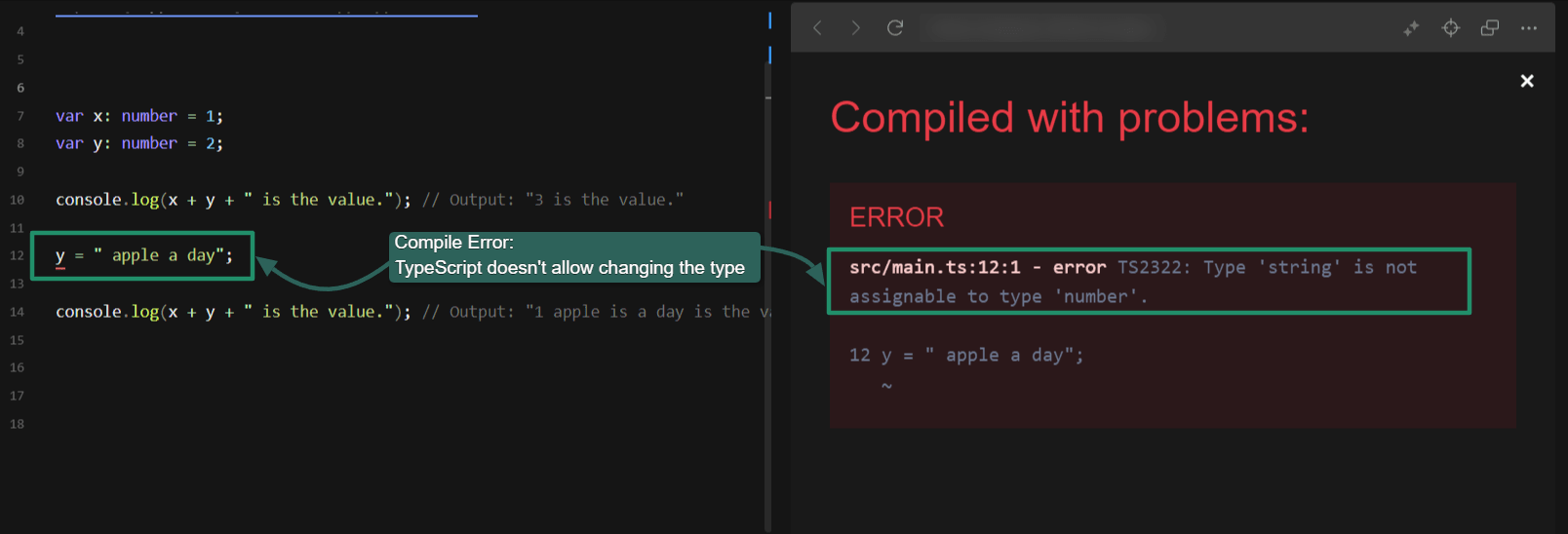
In TypeScript, however, the compiler immediately catches this error if we explicitly declare x and y as numbers:
TypeScript compiler catches type errors.
A JavaScript developer could simply write JavaScript code inside the Angular TypeScript files. Still, Angular uses other TypeScript-specific language constructs that would make it challenging to understand the rest of the code if you’re not a TypeScript programmer. This adds to Angular’s learning curve.
Components
Angular and Vue are both component-centric. Components get converted to HTML and JavaScript and rendered on a web page. In Angular, components almost always consist of:
An HTML file
A CSS file.
A TypeScript file
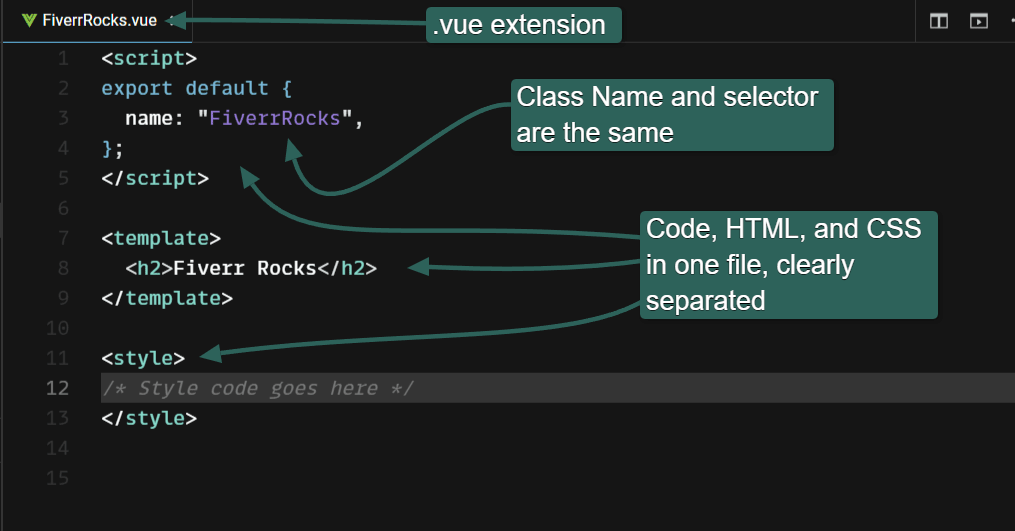
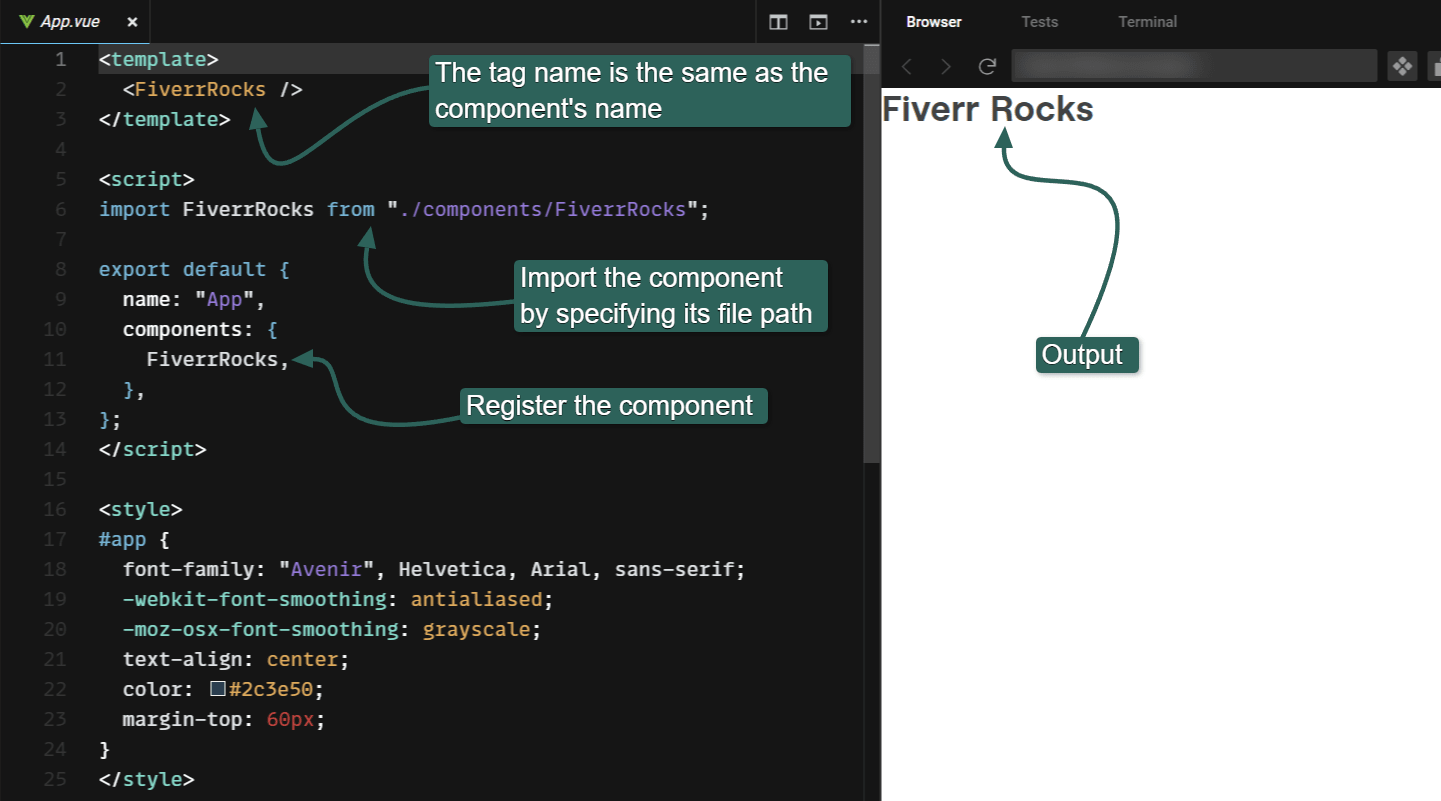
In Vue, a component usually consists of a single file with a .vue extension.
Technically, single-file components also exist in Angular, but they are extremely rare.
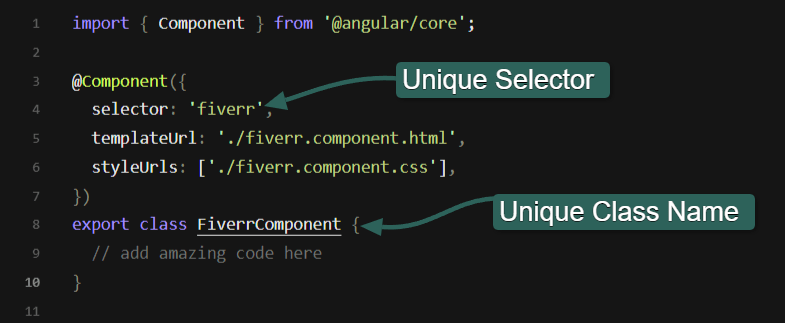
Each Angular component has a selector attribute related to an associated HTML tag. For example, we might specify our component’s selector as fiverr. Then, whenever we use the tag in our Angular app, the tag is replaced with whatever code exists in our Fiverr component.
To create an Angular component called FiverrComponent, we would do the following:
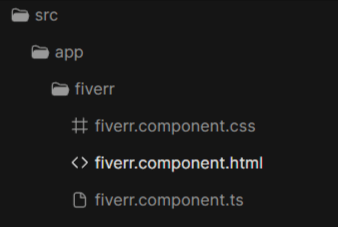
1. Create a folder for the component in the src/app folder, and add an HTML, CSS, and TypeScript file to that folder. These files are typically named [component-identifier].component.[extension].
A HelloWorld component would therefore likely have the following structure:
helloworld.component.css
helloworld.component.html
helloworld.component.ts
You can automate this procedure using the Angular CLI.
Angular folder structure for a component.
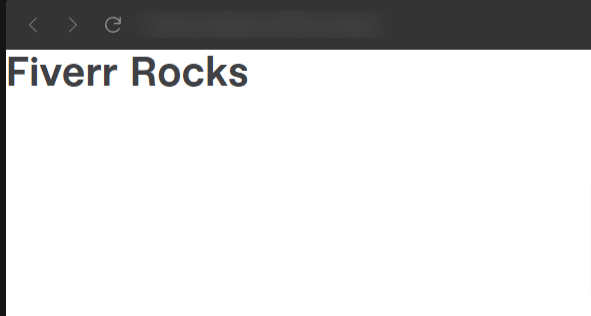
2. Add the TypeScript code and associated HTML. We created a simple HTML file with an H2 tag that says “Fiverr Rocks.”
TypeScript code in an Angular component.
HTML file:
3. Register the new component in an app.module.ts file:
Registering a new component in app.module.ts.
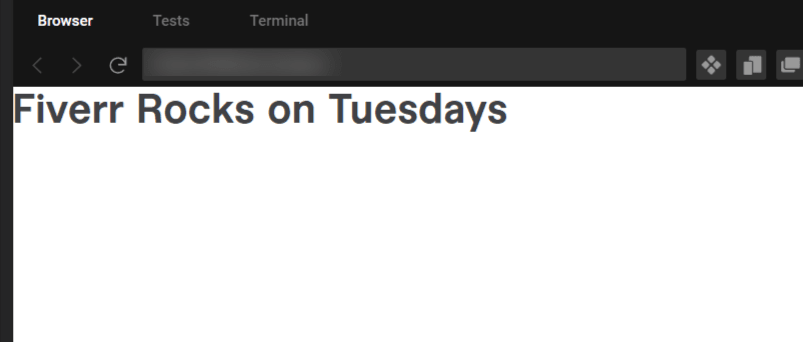
4. Add the new selector as an HTML tag wherever you want the Fiverr component code and HTML to render.
 August 3, 2026
 13 minute reading