Browse categories
Explore
Fiverr Pro
English
$
USD
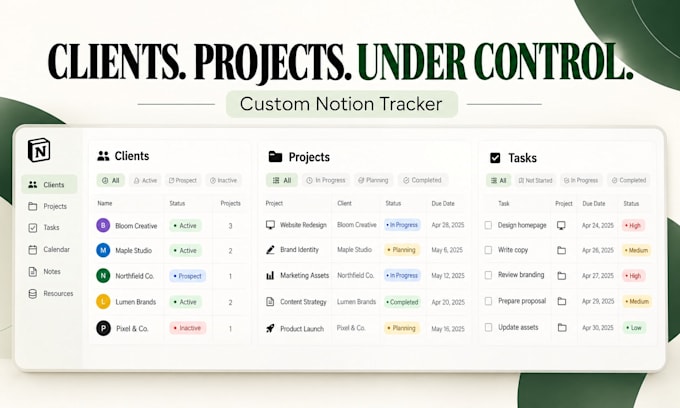
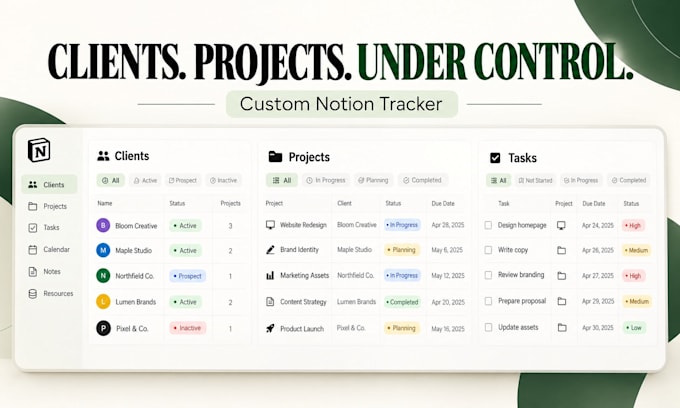
Freelancers often juggle client details, project updates, tasks, and deadlines across spreadsheets and inboxes. I will build a custom Notion client and project tracker that brings this work into one organized workspace, so you can see what is active and what needs attention.
YOUR NOTION WORKSPACE CAN INCLUDE:
The setup is tailored to the package you choose, whether you need a straightforward client tracker or a connected workspace for managing clients, projects, and tasks together.
This is ideal for freelance designers, developers, consultants, and other independent service providers who want a practical system they can maintain in Notion. The workspace is built around your tracking needs, not a one-size-fits-all layout.
Choose the package that matches the level of setup you need and get a clearer way to organize your client work in Notion.


Software:
Other
Can you customize the tracker to match my freelance workflow?
Yes. I can tailor client fields, project statuses, task priorities, and dashboard views to your workflow within the scope of your selected package.
Can I track multiple projects for the same client?
Yes. The Standard and Premium packages can include linked client and project databases, allowing you to associate multiple projects with the relevant client.
Will the tracker show overdue tasks and upcoming deadlines?
I can configure due-date fields and filtered views to help you identify upcoming and overdue work. Automatic notifications are not included by default.
Can you improve my existing Notion workspace instead of creating a new one?
Yes. I can customize an existing workspace if its structure and your requested changes fit the selected package. More extensive restructuring may require a custom offer.
Can I import my existing client list and project records?
Data migration can be arranged as an additional service. The price depends on the file format, number of records, and complexity of the data.
Will the tracker work on both desktop and mobile?
Yes. Notion workspaces can be accessed through Notion's supported desktop, web, and mobile experiences. The layout will use Notion's available features.
Do I need a paid Notion subscription to use the tracker?
A basic client and project tracker can generally be built on Notion's free plan. Requirements involving paid-plan features will be discussed before work begins.
Can you include invoices and payment tracking for each client?
Basic invoice-status or payment-tracking fields may be possible as an agreed addition. Full invoicing, payment processing, and accounting integrations are not included in the standard packages.
Will you set up automatic reminders and connect other apps?
The standard packages focus on databases, views, and dashboards. External integrations and advanced automation require separate scoping and pricing.
What is the difference between the Standard and Premium packages?
Standard includes linked client and project databases, task views, deadlines, and a dashboard. Premium expands the workspace with additional views and a more complete freelancer setup, plus a usage guide.