Browse categories
Explore
Fiverr Pro
English
$
USD


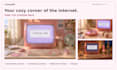
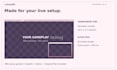
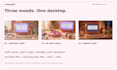
A cozy pink desktop aesthetic for your stream. This premade, non-exclusive
digital pack includes three animated MP4 screens (Starting Soon, Be Right Back,
Ending Soon), matching static PNGs, a transparent gameplay overlay, two webcam
frames (16:9 and 4:3), and an original MOV stinger with alpha transparency.
Set the stinger scene switch point to 1200 ms in OBS.
Includes English and Italian setup guides. Original media formats, native
dimensions, audio and transparency are preserved. Visuals are AI-assisted.
Manual setup. No custom editing, installation, alerts, exclusive rights or
After Effects projects are included. Only webcam SVGs are editable source files.
Overlays are static. Perfectly seamless loops are not guaranteed.
Please inform the freelancer of any preferences or concerns regarding the use of AI tools in the completion and/or delivery of your order.
cutesyhd
Languages
Is this a custom or premade stream pack?
This is a premade, non-exclusive pack with the design shown in the previews. Custom colors, usernames, logos and other personalized changes are not included. The same pack is available to other buyers.
What is included in the pack?
You will receive 3 animated screens: Starting Soon, Be Right Back and Ending Soon; 3 matching static screens; a transparent gameplay overlay; 16:9 and 4:3 webcam frames; an animated MOV stinger with alpha transparency; and OBS setup guides in English and Italian.
Which elements are animated?
The Starting Soon, Be Right Back and Ending Soon screens are animated, along with the stinger transition. The gameplay overlay and webcam frames are static. Matching static versions of the three animated screens are also included.
Does the stinger have a transparent background?
Yes! The stinger is supplied in its original MOV format with its alpha transparency preserved. It has not been converted to MP4 or flattened onto a background. The gameplay overlay and webcam PNGs also include transparency.
How do I set up the stinger in OBS?
Add a Stinger under Scene Transitions, select the included MOV file and choose Time (milliseconds) as the transition point type. Set the transition point to 1200 ms and leave Track Matte disabled. Play the full animation: 1200 ms is the scene switch point, not the total video duration.
Can I edit the text, colors or designs?
The scene labels and designs are baked into the supplied media. Editable SVG files are included only for the webcam frames. After Effects projects and editable source files for the animated scenes and stinger are not included.
Does the pack include audio?
The original MP4 scenes and MOV stinger retain their original audio. You can mute the scene sources and adjust the stinger audio settings in OBS. A separate music soundtrack is not included.
Are the animated scenes seamless loops?
The animated screens can be set to repeat in OBS, but perfectly seamless loop transitions are not guaranteed. Matching static PNG screens are included as an alternative.
How will I receive and install the files?
The pack is delivered as a ZIP file through your Fiverr order. Download and extract it before adding the files to OBS. English and Italian setup guides are included. Installation is manual; remote setup is not included.
Can I use the pack on monetized streams?
Yes. You may use the assets on your own channels, including monetized streams, videos and social content. You may not resell, share or redistribute the assets, include them in another downloadable pack, or claim authorship.


