Browse categories
Explore
Fiverr Pro
English
$
USD
Excel Automation and Python Scripting Expert
Are you spending hours manually updating Google Sheets, copying data, or sending repetitive emails?
I will build reliable, custom Google Apps Script solutions to automate your Google Workspace workflows so your spreadsheets work for you.
### What I Can Build For You:
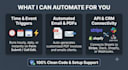
* **Event-Driven Triggers:** Run scripts automatically on edit, on form submit, or on a timed schedule (daily/hourly).
* **Automated Email Notifications:** Auto-send customized emails via Gmail with dynamic row data and PDF attachments.
* **Data Processing & Archiving:** Automatically move, filter, merge, or archive rows between tabs or separate sheets.
* **Custom Functions:** Fast formulas tailored to business logic that standard formulas cannot handle.
* **External Webhooks & API Integration:** Connect Google Sheets to external services (Stripe, CRMs, Slack, or webhook endpoints).
* **Custom UI:** Add custom menus, dialog boxes, and sidebar buttons inside your spreadsheet for one-click operations.
### Why Work With Me?
* Clean, well-commented, and efficient code.
* Clear instructions and video walk-throughs on how to run and manage the script.
* Post-delivery assistance to ensure smooth operation in your account.




What access do I need to provide?
You can share a duplicate or sample copy of your Google Sheet containing dummy data with editor permissions. You do not need to share sensitive personal or live financial data.
Can the script send automated emails through my Gmail?
Yes. Apps Script integrates natively with your Gmail account to send formatted plain text or HTML emails based on trigger rules.
Will the script continue running automatically when I close my browser?
Yes. Time-driven triggers and form-submit triggers run on Google's cloud servers, operating independently of whether your computer or browser is open.
Can you connect Google Sheets to third-party tools?
Can you connect Google Sheets to third-party tools?


