Browse categories
Explore
Fiverr Pro
English
$
USD
Senior Executive
Turn repeated spreadsheet preparation into a reusable Python workflow.
I will clean, merge, validate, split or convert your CSV and values-only Excel exports using rules we agree before starting.
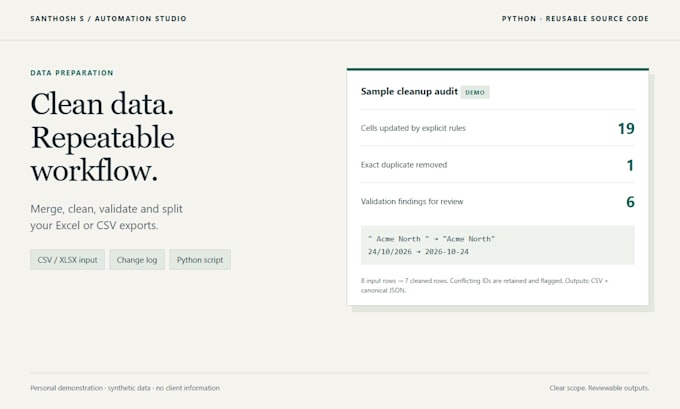
Typical tasks: trim spaces, standardize case and dates, combine same-schema files, remove exact duplicates, flag conflicting IDs, check required fields and ranges, or split records by team.
You receive the reusable script, run instructions, cleaned CSV and canonical JSON, a cell-change log where applicable, and a run summary with source-file fingerprints. Original files are preserved.
My personal synthetic demo records 19 changed cells, one exact duplicate removed and six validation findings. These are sample results.
Packages are limited by files, combined rows, columns and explicit rules. One rule means one operation applied to one column. Native XLSX formatting, macros, live integrations and manual research require a separate scope. Formula cells need an evaluated-values export.
Premium includes one Windows setup walkthrough and 14 days of delivered-scope defect fixes.
Send a sanitized sample, desired output and exact rules so I can confirm the right package.
Technology:
Excel
•
Python
Expertise:
Data manipulation
•
Data validation
•
Transformation
Will I receive a reusable script?
Yes. Python source and run instructions are included. You can rerun it locally on files with the agreed structure.
What counts as one cleaning rule?
One operation on one column, such as trimming Name or converting Review Date using one agreed format. Merge, split and validation steps are scoped before the order.
Will you remove records with conflicting IDs?
Only exact duplicates are removed when requested. Conflicting records are retained and flagged for review; I do not guess the correct value.
Do you deliver a formatted Excel workbook?
Standard outputs are Excel-compatible CSV, canonical JSON and logs. CSV does not retain workbook styles, formulas or multiple sheets. A native formatted XLSX workbook needs a separate agreed scope.
Can the script read Excel formulas?
Please export evaluated values first. The workflow rejects formula cells to avoid relying on missing or stale cached results.
What do revisions cover?
Adjustments within the agreed files, schema and rules. New data sources, extra columns, additional rules or new integrations change the scope.
