Browse categories
English
$
USD
Connect to your AI

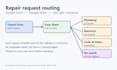


Tenants send maintenance requests and someone forwards each by hand. This gig replaces that, using the Google Form you already have. No new software.
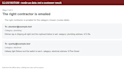
How it works: you share your Google Form, your Google Sheet and a short list of who handles which category. We connect them, test with sample requests on your own form, show you the rows and contractor emails, and you confirm.
What you get:
Privacy: our service account reads the Form and Sheet you share, and notification copies are kept in our mailbox; we agree retention with you before starting (Google Trash may hold copies a while). Remove our access any time; no password needed. Emails go from our address under your business name.
Not an emergency line. Not included: paying contractors, tenant replies, CRM writes, more than six categories.
Built with AI help. We test every setup on your own form and show you the result before you confirm.
Please be aware that it is against Fiverr's policies for sellers to include themes, templates, or any other elements that infringe third-party rights or applicable laws in the delivered work. Read more about in our Guide to Responsible Digital Creation.
Google Form and Sheet automations for small businesses
Languages
Do you need my Google password?
No. You share the Form and Sheet from your own account and can remove our access at any time.
Will it send the same request twice?
Each form response is recorded, and in our tests a repeat check did not create a duplicate row or email. We show this in your test.
How quickly is a request forwarded?
The form is checked on a schedule we agree with you at setup. We do not commit to an exact time; we tell you the schedule before you confirm.
What do you keep when the job ends?
We remove our access when the job ends. Notification copies in our mailbox are handled under a retention and removal process we agree with you before the service starts; Google may keep messages in Trash after they are moved there.
How are the emails sent, and where do replies go?
Notification emails are sent from our sending address with your business name shown. Replies go to your office address.
How do I know a request is urgent?
If your form asks how urgent it is, an urgent answer puts URGENT at the start of the email subject and the Sheet row. Who gets the email does not change.


