Browse categories
Explore
Fiverr Pro
English
$
USD
Web and App Developer, SEO Expert, Content Writer
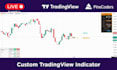
Are you looking for a professional, non-repainting, high-win-rate TradingView indicator?
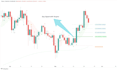
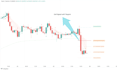
This indicator is built exactly in the style of the famous OCS AI Trader that traders love, but with tons of extra professional features that make it superior for scalping, day trading & swing trading on Forex, Crypto, Stocks, Indices & Futures.
Features:
500+ happy traders already using it. Lifetime free updates!
Order now and start trading like a pro today!
Keywords:
tradingview pine script, pine script indicator, ai trader pro, ocs ai trader, ocs style indicator, tradingview indicator, buy sell signals, scalping indicator, trailing stop loss, volume filter indicator, pivot indicator, win rate dashboard, non repainting indicator, forex indicator, crypto indicator, pine script v5, custom pine script
Platform:
TradingView
Development technology:
PineScript
Is this indicator repainting?
No. Signals only appear on bar close and never disappear or move. 100% non-repainting.
Will this work on crypto/forex/stocks?
Yes, works perfectly on any market and any timeframe. Most traders use it on 5m–15m for scalping.
Do you provide the source code?
Yes, you get the full editable .pine source code in all packages.
Is this the same as OCS AI Trader?
It is built in the same style and logic (2-candle + volume) but with many more professional features (4 TPs, trailing stop, dashboard, debug panel, statistics, etc.). Most traders say this one performs better.
How to install?
I send you the .pine file + step-by-step guide. Just open Pine Editor → Paste → Add to chart. Takes 30 seconds.
Will you keep updating the indicator?
Yes, everyone who buys gets free lifetime updates whenever I release a new version.


