Browse categories
Explore
Fiverr Pro
English
$
USD

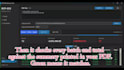


Tired of retyping numbers from reports into Excel? I convert billing lists, statements, posting lists, invoices, and other financial documents into clean, structured Excel files and I verify every total against your original file so you can trust the data.
WHAT YOU GET:
- Accurate PDF-to-Excel conversion powered by Python automation
- Every batch total cross-checked against the summary in your document (green means it matches)
- Clean, ready-to-use formatting with proper columns, dates and numbers
- Full source code with detailed comments included
- Fast delivery with revisions so you're 100% satisfied
WHY ME:
I build a custom tool for YOUR exact file layout not a generic converter. You get verified Excel output plus a reusable tool, turning hours of manual work into minutes.
BEFORE YOU ORDER:
Please message me with a sample file first so I can confirm your layout. Text-based documents work best. Scanned/image files may need OCR just ask and I'll give you an honest assessment.
Stop retyping your documents. Send me a sample and get verified Excel back.
"Python automation for Excel PDF and data processing tasks"
Languages
Do you support scanned PDFs?
Text-based PDFs work best. Scanned files need an OCR step, so message me first.
Is my data safe?
Files are used only for your order and deleted after delivery.
Can you handle a different layout?
Yes, send a sample and I will confirm before you order.
What do you need from me to get started?
Just send me a sample of your PDF. I'll check the layout and confirm which package fits best before you place the order — no surprises
Can you handle scanned or image-based PDFs?
My standard process works best with text-based PDFs. Scanned PDFs may need OCR — message me first with a sample and I'll give you an honest assessment of what's possible.
How do I know the Excel data is accurate?
That's the whole point of my verification step. Every batch total in the Excel output is cross-checked against the summary printed in your PDF. If a total doesn't match, it gets flagged — green means verified.
My PDF layout is complex. Can you still automate it?
Yes — that's exactly what the Premium package is for. I build a custom desktop tool tuned to your specific layout, so you can process future files yourself in minutes.
Do I get the source code?
Yes. Every package includes the full Python source code with detailed comments, so you own the solution and can reuse or modify it anytime.
What counts toward the page limit?
One page = one PDF page processed. Basic covers up to 100 pages of a single layout; Standard covers up to 500 pages across multiple files.


