Browse categories
Explore
Fiverr Pro
English
$
USD
India
Voiceover Artist and Proofreader, Clear Indian English Narrator
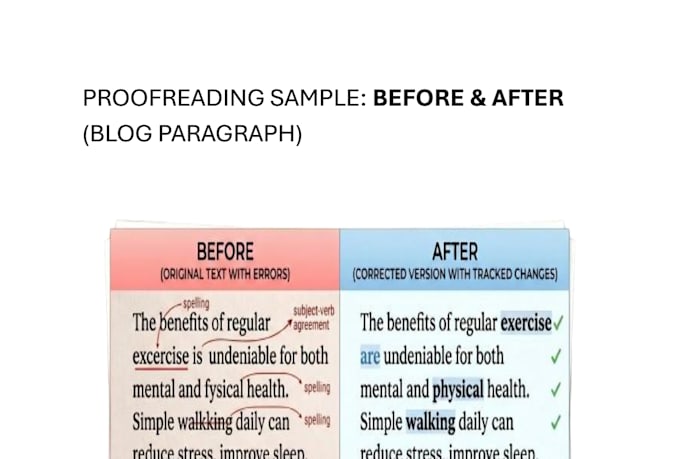
AI tools can catch typos but they can't tell you when your writing loses the reader. I'll proofread your blog post or article with a real human eye, fixing not just errors but also flow, clarity, and tone so your writing actually connects with your audience.
What I fix:
What you get:
I'm an engineering student with a strong eye for detail and a genuine love for well-written content. Every order gets my complete focus no rushing, no outsourcing, no AI doing my job for me.
Message me before ordering I'm happy to review a sample and confirm I'm the right fit for your project!


Language:
English
•
Hindi
Content Type:
Articles/ blogs
•
Documents
Please inform the freelancer of any preferences or concerns regarding the use of AI tools in the completion and/or delivery of your order.
Q: Do you use AI tools to proofread?
A: I use AI tools the same way a writer uses spellcheck — to flag potential errors. But every decision about what to change, how to reword something, and whether the tone and flow works is made by me after reading your document carefully. You're getting human judgment, not an automated output.
Q: What format should I send my document in?
A: A Google Doc or Microsoft Word file works best so I can use tracked changes. If you have a different format, message me first.
Q: What if I'm not happy with the edits?
A: One revision round is included. If something doesn't feel right, send it back and I'll fix it.
Q: How do I know how many words my document is?
A: In Google Docs go to Tools → Word Count. In Microsoft Word it's shown at the bottom of the screen. My base package covers up to 500 words — message me first if your document is longer.