August 3, 2026
 8 minute reading
Email marketing is one of the most cost-effective tools that businesses have, allowing brands to distribute messages directly into a customer's inbox, which is what brings customers to tools like Constant Contact.
There's no hoping that users search for the right keywords or stop to view an ad in a social feed while they're scrolling; that message is there. And when you're able to combine that with audience segmentation features that allow you to deliver relevant messages to each group of users, the efficacy increases. This makes email marketing almost undeniably valuable.
We know that every $1 you spend on email marketing can yield up to $42 in ROI, and 80% of marketers and small businesses say that email drives customer acquisition and sales. Since 61% of consumers like receiving promo emails from brands at least once a week, there's so much opportunity for ongoing engagement, brand building, and sales promotions.
Constant Contact is an outstanding email marketing tool, designed to help businesses improve their email marketing efforts. They allow you to send targeted, segmented, and personalized emails to increase the relevance of the content with the user, offer advanced automation features, and include detailed analytics.
We're going to dive deep into how to use the advanced and automated email features to help your business.
Constant Contact Overview
1. What is Constant Contact?
- Online eCommerce store creation and management
- Website builders
- Social media posting and monitoring
- 81% of small and medium businesses use email as their primary customer acquisition channel, and 80% use it for retention purposes
- Email open rates average around 21%, which is exceptionally higher than CTRs for other ad platforms; welcome emails have an average open rate of over 80%
- 60% of consumers have made a purchase based on an email they've received
- 61% of customers enjoy receiving weekly promotional marketing emails
2. How does Constant Contact work
Email marketing features and uses
- Create gorgeous emails either from scratch or premade, customizable templates
- Segment your audiences based on characteristics like user behavior, purchase behavior, or demographics
- Create triggered autoresponder series to deliver relevant information to each user, like welcome emails or abandoned cart series
- Redistribute emails to those who haven't opened them yet
- Utilize list-building features to expand your reach with new clients
- Send out surveys and polls to collect data directly from the customers
- Distribute coupon codes or exclusive deals
- A/B testing for different email subject lines to see what increases open rates
- Manage, monitor, and assess the progress of your email marketing campaigns by tracking results in real-time, including open, click, and sign-up rates
3. Constant Contact vs. MailChimp
- Constant Contact's list building and contact organization features are more intuitive. MailChimp uses a system encouraging one "master list" with different segments and tags, which can be confusing. "Segments" are segmented lists, while "tags" act more like internal notes.
- MailChimp's email marketing templates are a little more "polished," and are user-friendly to customize. These include block-based, drag-and-drop templates. On Constant Contact, this drag-and-drop technology keeps design work easy by letting you add blocks into the template. The templates themselves, however, are relatively cookie cutter and advanced customization options aren't available.
- Both have solid analytics platforms. That said, Constant Contact gives you more data in a single dashboard and graphic, making it easier to access. Constant Contact, however, doesn't allow you to hide metrics from reporting which can be irritating if you only want to focus on certain KPIs.
- MailChimp has an edge in automation over Constant Contact with a full automation suite. Many of their automation features are even available with their free plan. Constant Contact requires you to pay at least $45 a month for some automation features.
- Both allow for A/B testing, but MailChimp's A/B testing is more extensive. You can only A/B test subject lines with Constant Contact, while MailChimp allows you to change variations like subject line, body content, send time, or the "from" field." You can also determine how many users will get the test campaign.
- Constant Contact has a higher deliverability rate than MailChimp. As of 2020, Constant Contact's deliverability rate was 89.4% and MailChimp's was 81.6%.
- Constant Contact has superior customer service. That being said, MailChimp has solid service, too.
- MailChimp is more affordable. They have a free plan that allows for 2,000 subscribers and a 12K per month email sending capacity. Paid plans start at $10. Constant Contact doesn't have a free plan, and costs start at $20 a month for their basic plan.
- Constant Contact's extra features include more flexible survey options, the ability to collect and track donations securely on a landing page.
- MailChimp's extra features include old-school postcards and the ability to combine remarketing ads on Google, Facebook, and Instagram Ads.
4. Constant Contact integrations
Why are integrations important?
Contact growth & lead generation
Constant Contact for Facebook
- Streamlined creation of lookalike audiences based on your existing audience
- Get additional data into the performance of your Facebook and Instagram ad campaigns
- Have new contacts (including from Lead Gen Ads) pushed straight to your mailing list
Constant Contact for Shopify
- The ability to send branded, customized abandoned cart emails to relevant customers and track the efficacy
- Use drag-and-drop design tools to place product or discount coupons into any email, customizing the details
- Create pre-defined lists of high-value customers, first-time customers, repeat customers, disengaged customers, and warm leads to increase messaging relevance
- Promote goods and services available in your store with a product block in emails
Constant Contact for WordPress
- Use drag-and-drop tools to create the exact forms you need to generate leads
- Create forms that seamlessly fit in with the look and style of your overall WordPress site
- Have new email addresses captured through the forms be sent to your Constant Contact email list automatically
eCommerce integrations
Quickbooks Online for Constant Contact by Cazoomi
- Automatically push new customers through to your Constant Contact list, but only if they don't already exist in your database; measures are in place to prevent double entries
- Create campaigns based on recent customer actions like items purchased, date of checkout, and other sales triggers
- Keeps your data list fresh and organized while giving you access to additional data based on customer interactions
Shopify eCommerce integration
- You can sync unlimited contacts from the two platforms, creating one fluid database that's always up to date
- Set the stage for email marketing list segmentation and targeted campaigns based on purchasing behavior
- There are no more double entries needed for uploading customer lists, allowing for automatic autoresponder series to take place right away after a sign-up or a purchase
Contact databases and CRMs
Salesforce CRM by SyncApps
- Sync data from campaigns, events, customer lists, leads, accounts, and custom fields between the two platforms
- Automatically sync opt-out data across both platforms, regardless of where the opt-out occurred originally
- Create unique audience segments based on data from Salesforce, including stage of the buyer's journey, recent interactions with a brand, product interest, and more
- Use Salesforce forecasting capabilities to improve your email marketing campaigns overall
MailMunch
- Grow your email list with different easy-to-create form types, the data from which are then sent straight to Constant Contact
- All forms are responsive and mobile-optimized, ensuring that you're not missing out on any potential new leads
- You can even have different opt-in forms appear on separate pages to increase overall responsiveness
- Get in-depth analytics to determine which pages, posts, and forms are most effective
Blogging & content management integrations
Viewbix
- Add Content Contact sign-up forms to any video
- Have the data from these forms be sent directly to the Constant Contact database in real-time
Privy
- Sending new contact information to Constant Contact
- Automatically using list-based targeting centered around what opt-in the user converted on or what campaign they saw
- Distributing customizable autoresponders and automated email campaigns when users join your email list
Social media integrations
Constant Contact app for HootSuite
- Monitor Constant Contact email marketing campaigns within Hootsuite's dashboard
- Share Constant Contact campaigns to social media sites like Facebook or Twitter
- See a big-picture view of your cross-platform campaigns in a single dashboard
LIFT- FanCONNECT
- Integrate to build customer lists quickly
- Distribute personalized coupon offers to your customer lists
- Gather email addresses that can be pushed straight to your Constant Contact account
Mobile integrations
Constant Contact's list builder for iOS and Android
- Collect customer information in-person in a secure, streamlined way
- Have all that user data go straight to your Constant Contact account
- If the tablet is offline, the app will store the data and sync next time the device is connected to the internet
- Easy-to-customize preset forms with adjustable fields of information, brand logos, greetings, and promotional messages
Landing pages by LeadPages
- Access to create unlimited pages and domains that can accommodate an unlimited amount of traffic
- Collect lead information from any site with embeddable lead forms
- All forms are entirely mobile-friendly and easy for your audience to complete on phones and tablets alike
- Easy split testing features to assess the efficacy of your lead forms
- LeadPage's "digital asset delivery system" will send lead magnets or opt-in bribes to new subscribers to incentivize further conversion.
5. Getting started with Constant Contact
Add your contacts
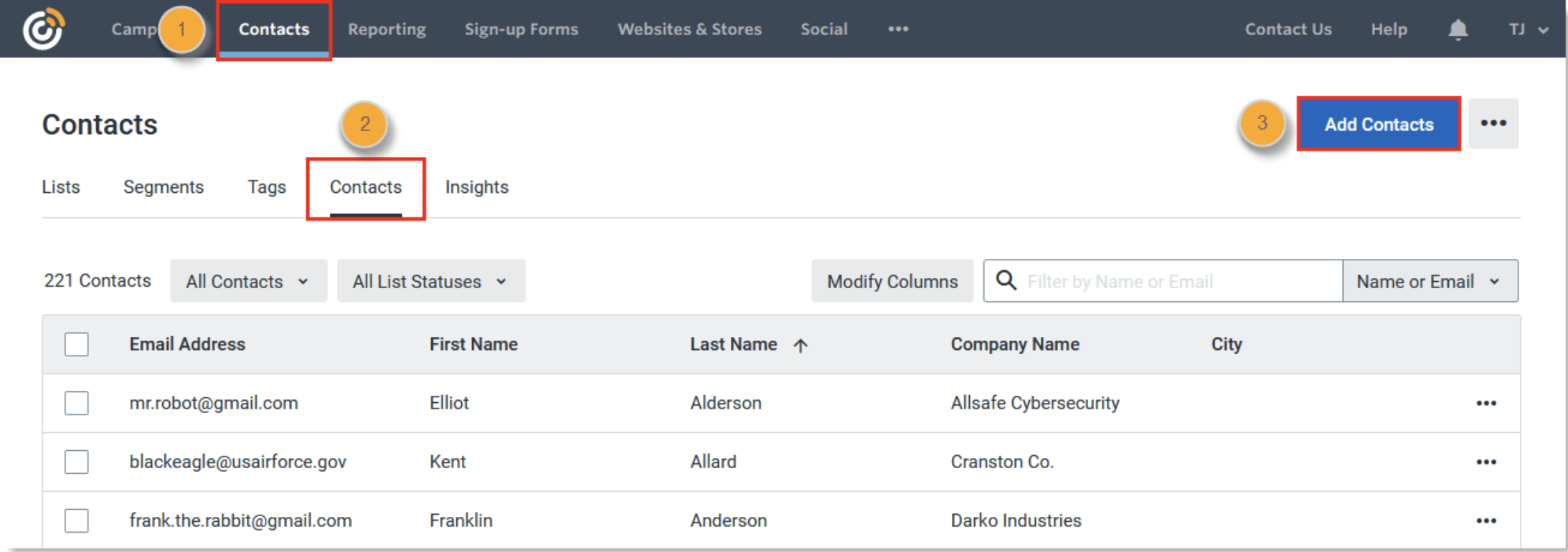
- Create a contact manually
- Enter (or paste) multiple contacts and their information into the system at a time
- Upload a list from a customer file, like an Excel or Google Sheets file
- Import contacts from integrated tools
Create and send your first email
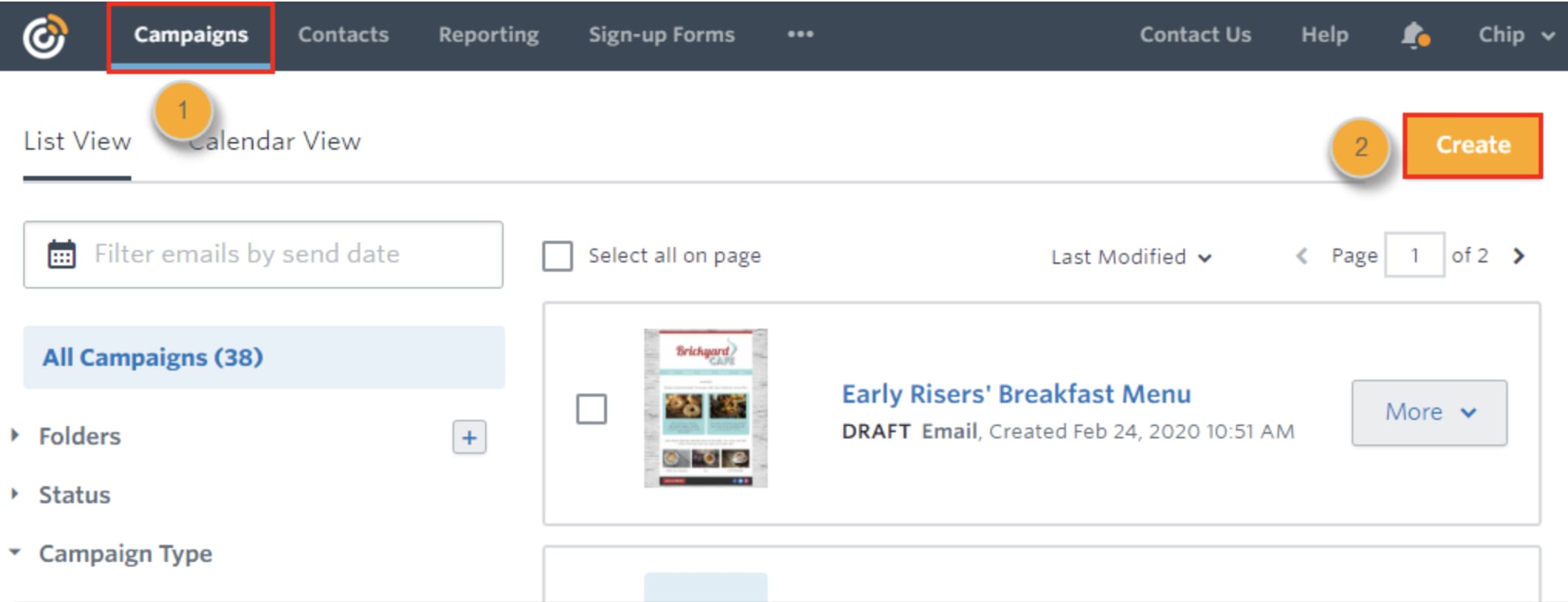
- Add action blocks, like the option to RSVP, make a donation, or take a poll
- Feature products with integrations like those from Shopify
- Add in clickable CTA buttons
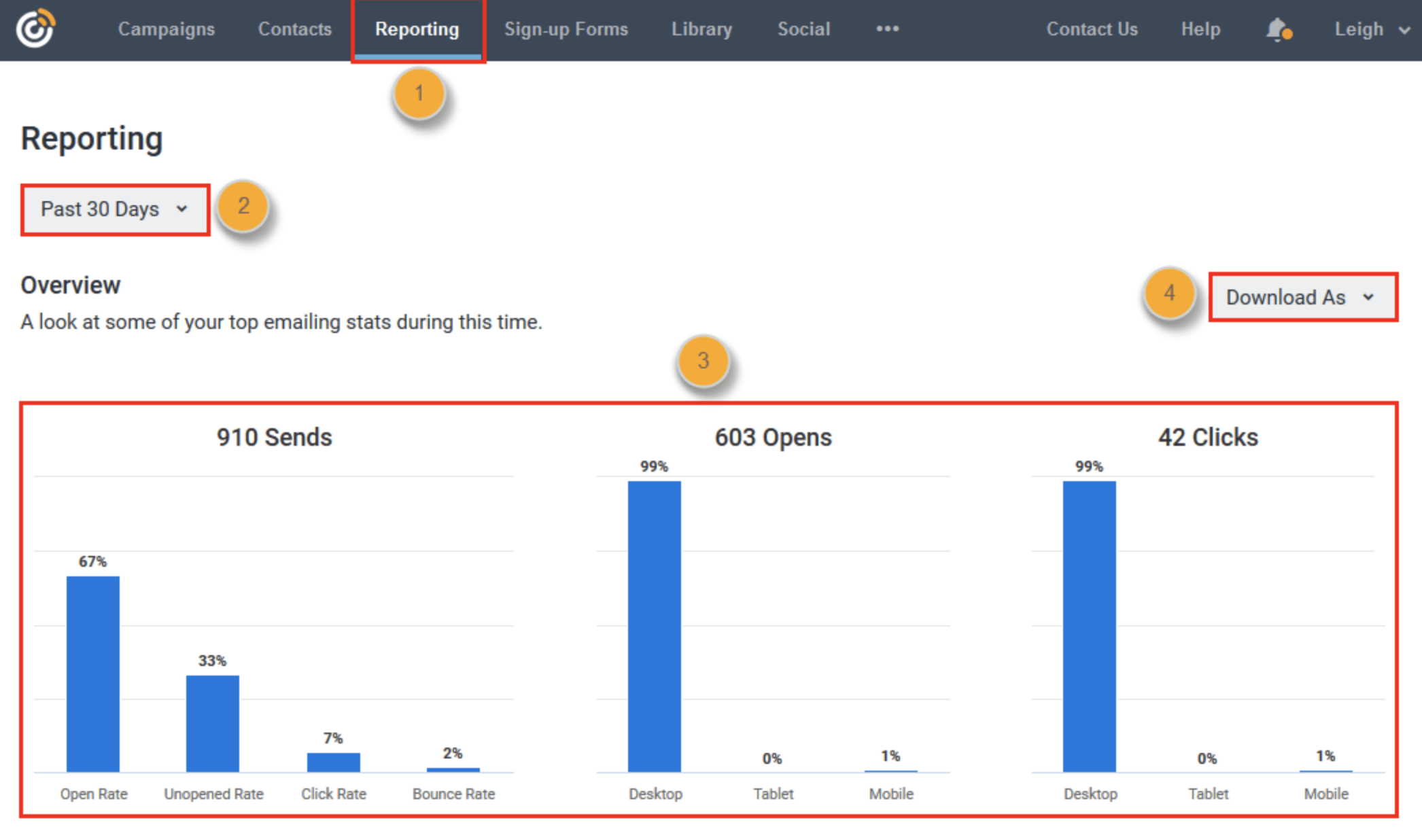
View your reports
Ways to grow your contact list
- Create sign-up forms to generate more contacts on your site; users who complete the forms will automatically be added to your site
- Sync up your account with Facebook to get access to your Facebook Lead form submissions
- You can use the Join My List app on Facebook to encourage users to share their email information so you can get in touch
6. Constant Contact Pros and Cons
The pros of Constant Contact
- It has an intuitive interface. It has an exceptionally user-friendly interface, which is a big deal. There isn't a significant learning curve involved, and you can dive right in even if you don't have much email marketing knowledge.
- It has outstanding deliverability rates. It has an industry-leading rate of deliverability, meaning that those emails are more likely to be received by users and less likely to wind up in the dreaded spam folder. That's the goal.
- There are extensive integrations. As we've discussed above, there are a large number of integrations available (over hundreds) with Constant Contact. You can have the tool work with a large number of platforms that you're already working with, including Google Analytics, third-party tools, and more. The more streamlined your marketing efforts are, the better.
- It has a full suite of features. There are a ton of marketing features available here even outside of email marketing. You can create lead forms, landing pages, and more. And the email marketing features are incredible, with in-depth analytics, split testing, and excellent list segmentation options.
- It can integrate with social media marketing. Social media marketing and email marketing are two platforms where we're regularly engaging with our users for both selling purposes and relationship-building efforts. The ability to integrate the two is a massive advantage.
The cons of Constant Contact
- It has a high price point. Compared to other tools that offer similar features, the price point of Constant Contact is on the high side, which increases with the number of contacts added. This may be restrictive to small business owners. One review online also cited a poor billing policy, where they paid for a 12-month contract but that they needed to renew earlier due to raised pricing by the company.
- Templates lack advanced customization. While we do want to acknowledge that Constant Contact has a large library of different templates that are customizable, they don't have truly advanced customization options like some competitors.
- Automation lacks advanced customization. Basic automation features are included and available through Constant Contact, all of which are useful. There is, however, a lack of customization available that would be needed to accommodate more advanced workflows. While this likely wouldn't impact small businesses who want more simple automation, businesses who want to dive deep into complex funnels may want to consider another tool.